
ClickUp alternatives for service teams: eight options compared
The main ClickUp alternatives for service teams are monday.com, Asana, Teamwork.com, Productive, Scoro, Paymo, Harvest and PLYNTUM. ClickUp remains a strong choice for free, flexible task management. Switch when hours and invoices matter: Productive and Scoro add finance and sales, Harvest and Paymo add time and invoicing, and PLYNTUM keeps projects, time and invoices in one workspace.
Key facts
- ClickUp for 10 users
- ClickUp Business costs $170 a month for 10 users billed annually ($17 per user), checked 24 October 2026.
- ClickUp free plan and AI
- ClickUp has a Free Forever plan, and its AI add-on costs from $9 per user a month.
- Invoicing
- With ClickUp, client invoices live in another system; PLYNTUM has invoices and receivables on every plan.
- PLYNTUM for 10 members
- PLYNTUM Core costs $150 a month for a workspace of 10 members, or $120 a month billed annually.
- CRM scope and limits
- PLYNTUM’s CRM core is released for eligible users; AI analyses are not available today.
At a glance
Prices come from each vendor’s own pages, read on 24 October 2026; monday.com and Scoro on 25 September 2026. Annual billing unless stated; taxes excluded. Feature scope differs — the comparison pages have the detail.
| Tool | Best for | Cost for 10 people | Georgian interface |
|---|---|---|---|
| ClickUpthe tool you are replacing | Baseline: your current tool | ClickUp Business for 10 users: $170 a month, billed annually. Timesheet approvals are on Enterprise, priced on request. | Not found in the information we read |
| monday.com | A different general work tool, with invoicing still done elsewhere | monday.com Pro for 10 seats: $190 a month, billed annually. | Not among the 15 interface languages |
| Asana | Structured projects with clients as free guests; billing elsewhere | Asana Advanced for 10 users: $249.90 a month, billed annually, plus the Timesheets & Budgets add-on, which has no published price. | Not among the 14 display languages |
| Teamwork.com | Agencies wanting a project tool made for client work | Teamwork.com Accelerate for 10 users: $249.90 a month, billed annually. | Not stated on the pages we read |
| Productive | Agencies wanting a sales pipeline, delivery and finance in one tool | Productive Professional for 10 users: $250 a month, billed annually. | No; the interface is in English only |
| Scoro | Firms that quote every job and want CRM and WIP reports | 10 users at the displayed rates: End-to-end €520/month; Quote to Cash €250/month, before onboarding and add-ons. Confirm billing cycle. EUR is not converted into USD and no direct saving is calculated. | Not found in the information we read |
| Paymo | Freelancers and small teams: tasks, time and invoices in one app | Paymo Plus for 10 users: $159 a month at the standard monthly price. | Not found in the information we read |
| Harvest | Keeping ClickUp for tasks and adding time tracking and invoicing | 10 seats, annual billing: Teams starts at $90/month, Enterprise at $140/month. Forecast adds $50/month for 10 people (Forecast price read 25 September 2026). These are base estimates; usage fees are excluded. | Not found in the information we read |
| PLYNTUM | Tasks, logged hours and invoices in one workspace at one price | PLYNTUM Core: $150 per month, or $120 per month billed annually ($1,440 paid yearly), for up to 10 members. | Georgian and English |
Why service teams look for a ClickUp alternative
ClickUp is one app for tasks, docs, goals and chat, made for any kind of team rather than for agencies. For internal work that is often enough. Client work adds three questions each month: how many hours went into this project, did it make money, and has the client paid?
- Invoices are in another system. Hours logged in ClickUp are copied into whatever raises the invoice, such as accounting software or a spreadsheet, and every copy is a place where an hour can go missing.
- The structure is yours to build. Someone on your team has to set up and maintain budgets, rates and billing statuses.
- Per-user pricing, with AI per user on top. Business is $17 per user a month billed annually (checked 24 October 2026) and the AI add-on starts at $9 per user (checked 25 September 2026): from $260 a month for 10 people.
Know what you would give up: a Free Forever plan, docs, goals and chat in one app, automations and an AI add-on. PLYNTUM has no free plan, and its AI analyses are planned. If you mostly need tasks and your invoicing works, moving may not be worth it.
How to choose: four questions for your team
- Who copies hours into the invoice? If someone re-types them every month, start with tools that hold hours and money together: Harvest, Paymo, Productive, Scoro, Teamwork.com or PLYNTUM.
- CRM core is released, subject to plan, role and permissions. Proposal drafts, won-deal handoff and manual forecasts have plan limits; inbox and integrations require separate setup. AI and private capture remain in development. Review CRM access and limits.
- Must a manager approve hours before billing? PLYNTUM does this from Core. Asana needs the Timesheets & Budgets add-on, sold per user with no published price (checked 24 October 2026).
- How big will the team be next year? Per-user prices rise with every hire; PLYNTUM charges per workspace, which is cheaper at some sizes and dearer at others. Try your own headcount in the stack calculator.
Working in Georgian? PLYNTUM’s interface is in Georgian and English, while Asana’s 14 display languages do not include Georgian. For the rest, the table shows what we found.
Seven ClickUp alternatives, one by one
Prices are from each vendor’s own pages, checked 25 September 2026 (ClickUp, Asana, Teamwork.com, Productive, Paymo and Harvest on 24 October 2026), before tax and billed annually unless stated; the table above has the cost for 10 people. The list is not ranked, and PLYNTUM, our own product, comes after it.
monday.com
monday.com is a general work platform whose Work Management product runs projects and tasks on boards you shape yourself. You can start free on up to 2 seats or try Pro for 14 days.
The limitation: its Work Management plans do not list invoices, expenses or receivables, and time tracking is a Pro and Enterprise column. Pro, at $19 a seat, costs more than ClickUp Business (checked 25 September 2026). PLYNTUM vs monday.com · monday.com alternatives
Who it suits: teams that want a general work tool like ClickUp, just not ClickUp.
Asana
Asana has a free Personal plan for up to 2 users, and its Advanced plan, $24.99 per user a month billed annually, adds time tracking (checked 24 October 2026). Guests are unlimited and free, which suits client work.
The limitation is the cost of control: timesheet approvals need the Timesheets & Budgets add-on, a per-user licence on top of Advanced’s $249.90 a month for 10 users, with no published price (checked 24 October 2026). Invoicing, expenses and leave are not on its pricing page, and there is no client portal. PLYNTUM vs Asana
Who it suits: teams with structured projects, clients as guests and billing elsewhere.
Teamwork.com
Teamwork.com is professional services software built around client projects, with resources and financials beside the tasks. Up to 5 users can use it free, and the trial lasts 14 days.
The limitation, coming from ClickUp, is price: Accelerate is $24.99 per user a month billed annually, about one and a half times ClickUp Business at $17 (checked 24 October 2026). PLYNTUM vs Teamwork.com
Who it suits: agencies that accept per-user pricing for a tool built for client work.
Productive
Productive covers resources, projects and finances for agencies and consultancies, and has a sales pipeline today, so a won deal becomes a project in the same system. It has a 14-day trial and a 3-seat minimum.
The limitation is cost: Professional is $25 per user a month billed annually, about one and a half times ClickUp Business at $17 (both checked 24 October 2026). It pays off if you use the pipeline and finances too. PLYNTUM vs Productive · Productive alternatives
Who it suits: agencies that want sales, delivery and finance in one place.
Scoro
Scoro combines projects, resourcing and finances for consultancies, agencies and engineering firms. It is strongest on the commercial side of the work: quoting, a sales CRM, resource planning, quoted-versus-actual and work-in-progress reports.
The limitation is an unclear price. App combinations cost €15–€52 per user a month, minimum 5 users, with an unlabelled billing cycle and onboarding and add-ons extra (checked 25 September 2026). The range in the table is an estimate, not a quote. PLYNTUM vs Scoro
Who it suits: firms that quote every job and want the CRM beside the work.
Paymo
Paymo is work management with time tracking and invoicing for small teams and freelancers. It is free for one user, with a 15-day trial.
The limitation is the price basis. Plus is $15.90 per user at the standard monthly price, introductory offers aside, so 10 users cost $159, a little less than ClickUp Business billed annually at $170 (both checked 24 October 2026). PLYNTUM vs Paymo
Who it suits: freelancers and small teams wanting tasks, time and invoices in one app.
Harvest + Forecast
Harvest tracks time and turns it into invoices; resource planning is sold separately as Forecast. Its reputation rests on time tracking that teams keep up, years in the market and many integrations; the trial lasts 30 days.
It sits beside ClickUp, so you pay for two tools. Ten people on ClickUp Business ($170 a month) plus Harvest Teams at $9 a seat ($90) cost $260 a month billed annually, before any usage fees or Forecast at $5 a person (checked 24 October 2026; Forecast 25 September 2026). PLYNTUM vs Harvest
Who it suits: teams that keep ClickUp and fix only time tracking and invoicing.
Weighing all-in-one business suites instead? See the Bitrix24 alternatives or all our lists.
Where PLYNTUM fits, and where it does not
Where it fits
PLYNTUM is business management software for service companies: projects and tasks, clients, people, time, invoices, expenses and receivables in one workspace. The difference from ClickUp is what happens to an hour. It is logged against a task that belongs to a project and a client; every logged hour counts in project cost, and from Core a manager approves the timesheet, which locks the week. Project profitability is logged hours plus direct expenses against the project value.
Invoices and receivables are on every plan; recurring invoices and a scoped client portal start with Core. See time tracking, finance and projects and tasks.
What it costs next to ClickUp
PLYNTUM is priced per workspace: Launch $55 for 5 members, Core $150 for 10, Scale $450 for 25, each 20% less billed annually (pricing). For 10 people billed annually, PLYNTUM Core costs $120 a month and ClickUp Business $170 (checked 24 October 2026). Which is cheaper depends on team size: PLYNTUM costs less at 3 to 5 people ($44 against $51–$85), at 8 to 10 ($120 against $136–$170) and at 22 to 25 ($360 against $374–$425). At other sizes ClickUp Business costs less: 15 people are $255, against $360 for PLYNTUM Scale. ClickUp Core, at $9 a user, and the free plan cost less than PLYNTUM at almost every size.
PLYNTUM saves most when it also replaces a second tool: against ClickUp Business plus Harvest ($260 for 10 people), Core is $140 a month less. Where ClickUp alone costs less, the gain is less copying between systems, not a smaller bill.
Where it does not fit
- No free plan. Only Launch has a 7-day trial.
- Not a general work app. If your ClickUp is mostly docs, goals and internal work, PLYNTUM will not replace it.
- Inbox channels and emailing proposals to clients are not part of CRM core. CRM core covers contacts, organizations, opportunities and a pipeline for eligible users.
- No automatic time capture. Time is logged by hand; private desktop capture is in development.
- Not accounting software. There is no ledger, no bank feeds, no tax filing and no payroll.
During the trial, check each ClickUp automation your team relies on.
When staying with ClickUp is the better call
- You sell fixed packages, never look at hours per project and invoice from accounting software without trouble.
- The free plan covers you. PLYNTUM starts at $55 a month.
- ClickUp is your company’s home, not just a task list. If docs, goals and chat hold how you work, moving only tasks splits the team across two apps.
- Your set-up works. If hours and invoices match every month, the weeks a move takes may not pay back; adding Harvest is the smaller change.
- You want AI in your work tool now. ClickUp sells it as an add-on; PLYNTUM’s AI analyses are planned.
Moving from ClickUp
There is no one-click importer from ClickUp into PLYNTUM, so plan the move as a short project.
- Pick the cut-over: the start of a month, straight after an invoicing run. If you pay ClickUp annually, check the renewal date.
- Move open work only. Closed tasks and old docs can stay in ClickUp or an archived export.
- Rebuild in client order: client, then project, then task. Hours in PLYNTUM belong to tasks, so profitability depends on this order.
- Enter rates and costs: what you bill each client and each person’s loaded hourly cost. Salary figures are visible to leadership only.
- Carry over what clients owe: unpaid invoices from your billing tool, so receivables start complete.
- Check the first month by hand against your old method before invoices go out.
Test on one real project first: Launch’s 7-day trial covers 5 members, and timesheet approval and recurring invoices start with Core. Need help planning it? Get in touch.
Sources
Every price was checked on the vendor’s own pricing page on the date shown next to it. If something has changed, tell us at info@plyntum.com and we will correct it.
- ClickUp pricing (checked 24 October 2026)
- monday.com pricing (checked 25 September 2026)
- Asana pricing (checked 24 October 2026)
- Teamwork.com pricing (checked 24 October 2026)
- Productive pricing (checked 24 October 2026)
- Scoro pricing (checked 25 September 2026)
- Paymo pricing (checked 24 October 2026)
- Harvest pricing (checked 24 October 2026)
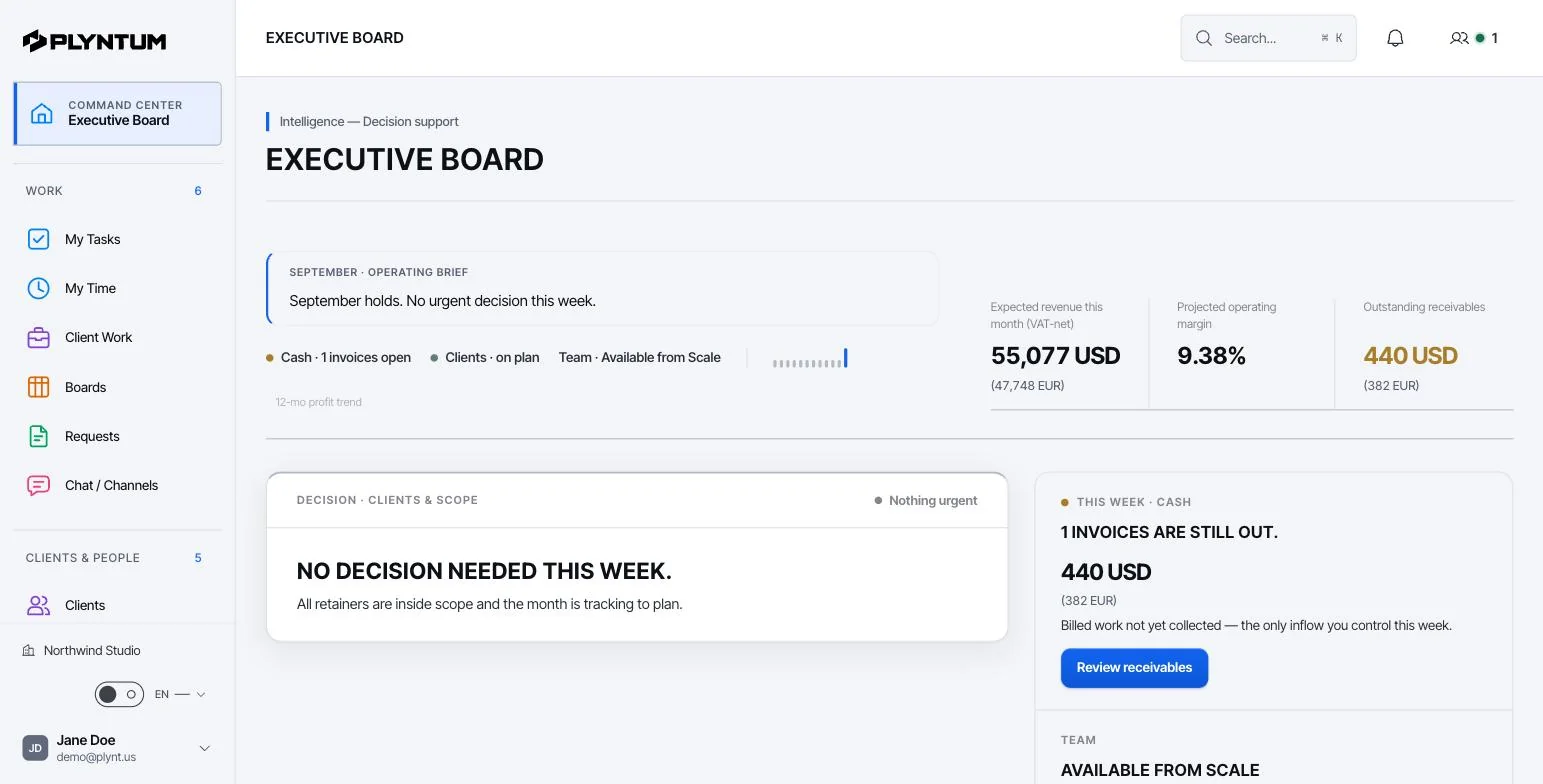
How it looks in PLYNTUM.
Screens from a demo workspace with sample data, as the product looks today.
Common questions
Start with the work that keeps getting stuck.
Bring one project into a connected workspace. See the work, the people and the cost together.