
Free cost estimate template for Excel
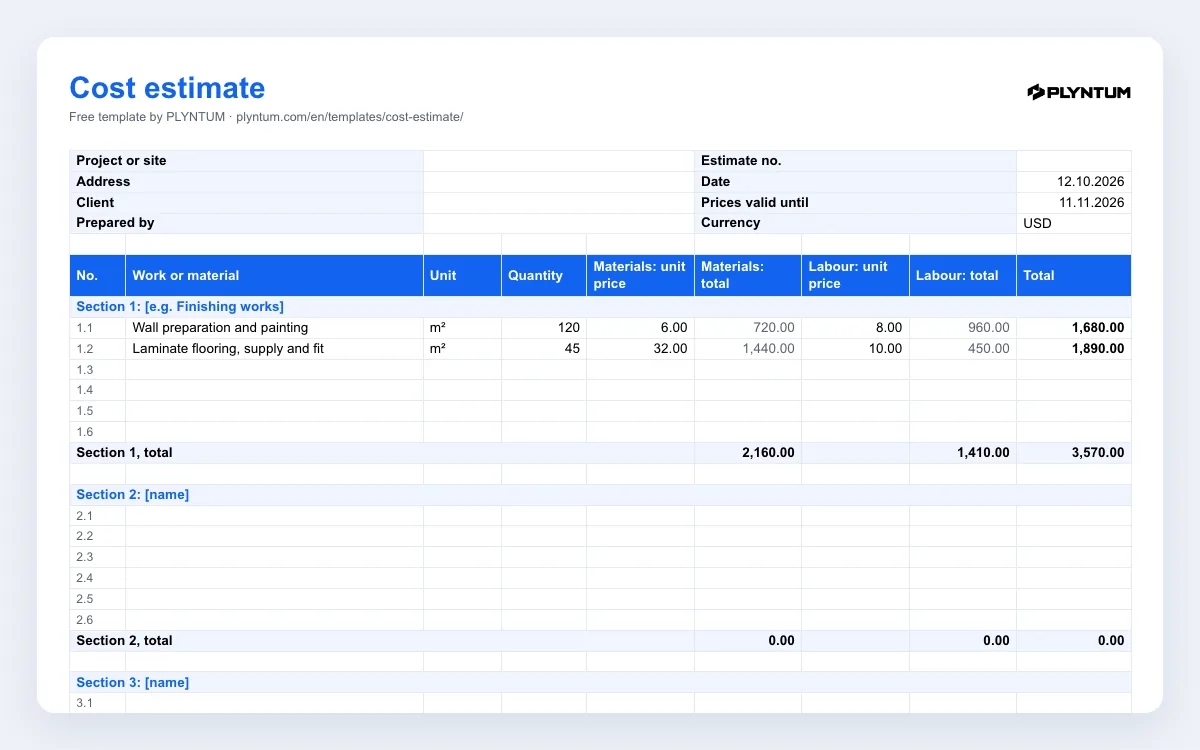
Download a free cost estimate template in Excel, in English and Georgian. It breaks a job into sections and lines, prices materials and labour separately on each line, adds contingency, overhead, profit and tax, and gives the client one total with every number behind it. It is built for renovation, fit-out and other project work that is priced before it starts.
Free, no sign-up · .xlsx with formulas, no macros · materials and labour, overhead, profit and tax · opens in Google Sheets and Numbers
.xlsx with formulas, no macros · materials and labour, overhead, profit and tax · opens in Google Sheets and Numbers
Won the job? In PLYNTUM the project carries its value and estimated hours, and from Core logged hours and direct costs are set against that value, so you see during the job whether the estimate is holding.
What is in the workbook
The file, plyntum-cost-estimate-template.xlsx, has two sheets. Estimate is the one you fill in and send:
- Top block: project or site, address, client, who prepared it, estimate number, date, the date until which prices are valid (30 days by default) and the currency.
- Three sections of six lines each, one section per stage of the job. Each line has a name, unit, quantity, the unit price of materials and of labour, and the totals for both.
- Section totals for materials, labour and the section as a whole.
- Summary: direct costs, contingency, overhead, profit, the total before tax, tax and the final total. The percentages are cells you can change.
- Signatures: who prepared the estimate, and the client’s agreement with a date.
The second sheet, How to use, repeats the steps below. Formulas only, no macros; the workbook opens in Excel, Google Sheets and Apple Numbers.
How the total is built
Every line multiplies the quantity by the unit price, separately for materials and for labour, so the client sees what is material and what is work. The summary then adds, in this order:
- Direct costs: the sum of all sections.
- Contingency: a percentage of direct costs for what the measurements did not show. The file uses 5% as an example.
- Overhead: a percentage of direct costs for the costs of running the business that no single job carries, such as the office, vehicles, insurance and management time. The example is 10%.
- Profit: a percentage of direct costs, contingency and overhead together. The example is 10%.
- Tax: on the total before tax. The English file starts at 0%; the Georgian file starts at 18%, the standard VAT rate in Georgia. Use the rate that applies to you, or 0% if you do not charge tax, and check with your accountant.
With the two example lines, 120 m² of wall preparation and painting and 45 m² of laminate flooring, direct costs come to 3,570.00 and the total before tax to 4,516.05. The percentages are examples, not norms: set your own from your past jobs.
Getting the estimate right
- Measure, do not guess. Take quantities from a site visit or from drawings. A quantity written from memory is the easiest mistake to make and the hardest to defend later.
- Name lines the way the client will check them. “Wall preparation and painting, m²” can be measured on site; “finishing works” cannot.
- Say what is not included. Add a line or a note for exclusions such as permits, furniture or waste removal: anything the client might take for granted.
- Date it and limit it. Material prices move; the “Prices valid until” cell tells the client how long your numbers hold.
- Keep the signed version. Every change during the job is priced against it. Agree changes in writing before the work, as you would with a scope of work.
Estimate, budget or proposal?
An estimate prices the work for the client before it starts. A project budget is your internal view of the same job: the hours and costs you expect against the price, and later the actual numbers. A project proposal explains the approach and the phases in words and usually carries a price summary; you can send the proposal with the estimate attached.
This template is a working estimate for private jobs. If a tender, a bank or a public client asks for an estimate in a set format, use their format.
Where PLYNTUM fits
Won the job? In PLYNTUM the project sits with its client and carries its value, the work is split into tasks with estimated hours, and people log hours against them. Direct costs such as materials or a subcontractor are recorded on the project, and from Core the logged hours at each person’s loaded cost, plus those costs, are set against the project value, so you see during the job whether the estimate is holding. PLYNTUM does not build estimates: the price is still worked out in this file. How project costs work in PLYNTUM.
Related pages
Common questions
Start with the work that keeps getting stuck.
Bring one project into a connected workspace. See the work, the people and the cost together.