
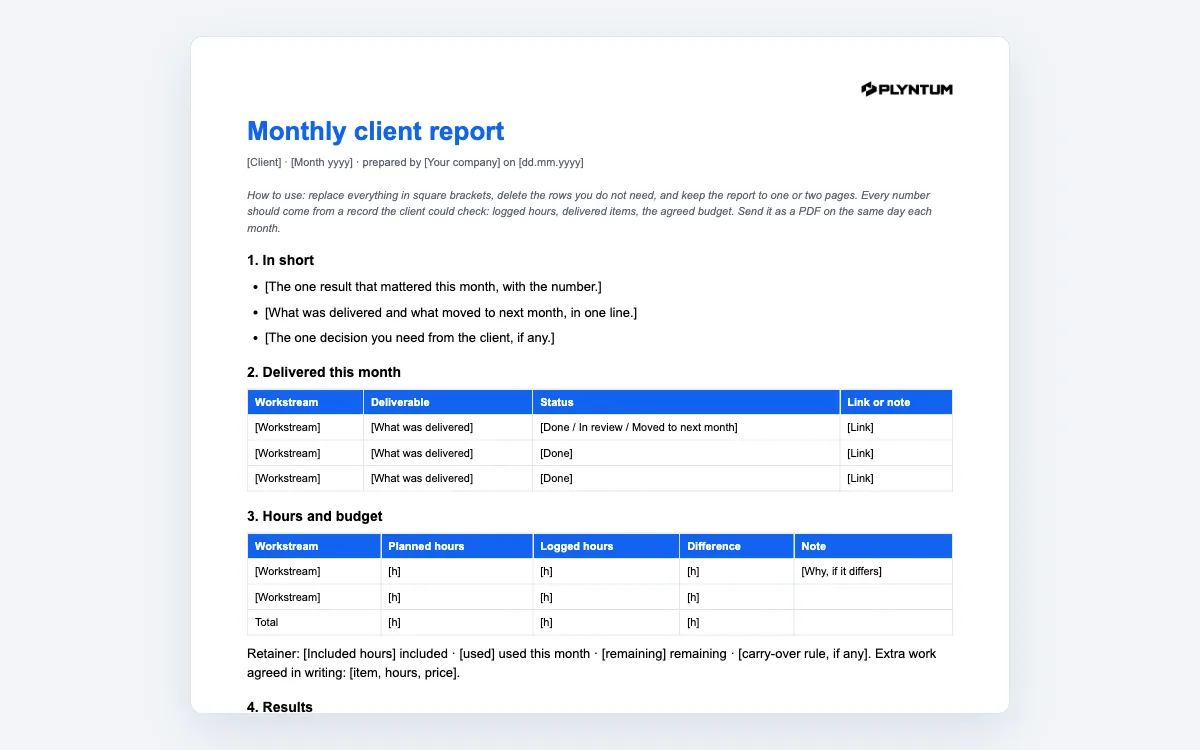
What is in the client report template
The file, plyntum-monthly-client-report-template.docx, has seven short sections:
- In short: three bullets: the result that mattered, what was delivered and what moved, the one decision you need.
- Delivered this month: a table of workstream, deliverable, status and link.
- Hours and budget: planned and logged hours per workstream with the difference, and a retainer line: hours included, used, remaining, and any extra work agreed in writing.
- Results: each metric with last month, this month, the change and the source it came from.
- Decisions we need from you: the options, your recommendation and the date.
- Plan for next month: item, owner, due date and what it depends on.
- Notes: risks, team changes, holidays.
The document opens in Word, Google Docs and Pages, carries a grey how-to note at the top that you delete, and is meant to be sent as a PDF.
How to write a client report people read
- Every number has a source. Logged hours from the timesheet, deliverables from the task list, metrics from the analytics or ad account with the date read. A number the client can check is a number the client believes.
- Lead with the result, not the activity. “Cost per lead down 18% after the landing page change” before “we published six posts”.
- One decision per report. If you need three, pick the one with a date and put the others in the plan. Decisions buried in prose do not get made.
- Hours against the retainer, every month. Included, used, remaining. The month you skip it is the month the client is surprised by extra work.
- No adjectives. “Strong month” tells the client nothing; the table does.
- Same day, same format, as a PDF. The second report should look like the first; a client learns where to look.
From report to renewal
A monthly report is the record a retainer renewal is decided on. Twelve reports that show hours used against hours included, deliverables against the agreed scope, and results with sources, make the renewal conversation a confirmation. A renewal without them starts from the client’s memory of the last bad week.
Keep the report consistent with the agreement: the included hours in section 3 are the ones in the retainer agreement, and extra work appears first in a decision line, then as an agreed item with a price, never as a surprise on the invoice. The invoice for the month should match section 3 line for line.