
Creative agency project management software for studios and design teams
Creative agency project management software should carry a brief through concepts, revision rounds and delivery, and show what each round cost. PLYNTUM keeps tasks, hours per phase and per revision round, invoices and project profitability in one workspace for creative agencies and design studios. It does not proof files or replace Figma or Adobe.
Key facts
- What it manages
- Briefs, concepts, revision rounds, hours per phase and per round, project expenses, invoices and profitability for fixed-fee creative work.
- Design tools
- Works next to Figma and Adobe apps, with no integration; files can be attached to tasks. No proofing or markup.
- Profitability
- From Core, logged hours at each person’s loaded rate are set against the fee and direct costs such as print or freelancers.
- Price
- Per workspace, not per seat: $55 a month for 5 members, $150 for 10, $450 for 25.
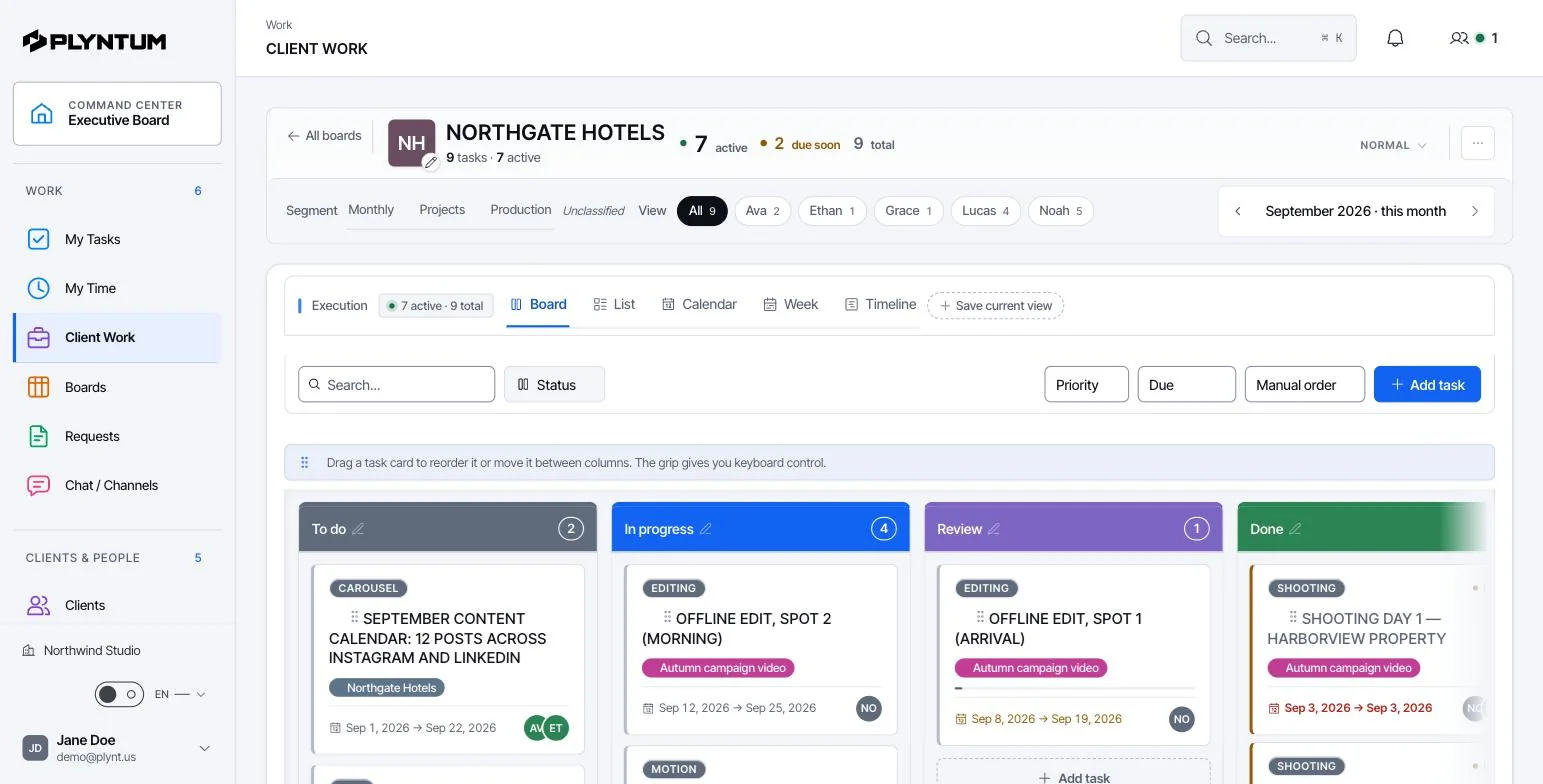
How it looks in PLYNTUM.
Screens from a demo workspace with sample data, as the product looks today.
The short answer
Creative agency project management software carries a brief through concepts, revision rounds and delivery, and shows what each stage cost. In PLYNTUM a brief becomes a project with tasks per phase, and hours are logged against each task, so you can see what the concept, each revision round and the final files took. An extra round the client asks for can be added as its own task with an estimate, so its hours show up separately. From Core, project profitability sets logged hours and direct costs against the fee. Plans are priced per workspace, from $55 a month for 5 members. PLYNTUM does not proof or annotate files, and it does not replace Figma or Adobe.
The third round is where the fee goes
An identity is sold as a fixed fee: research, three concepts, three rounds of revisions. The contract is signed and the price stops moving. The work does not. A founder asks to see one more direction. A copy change arrives after the layout is locked. The logo needs a version for an embroidery supplier.
Each of those is small enough to absorb. Together they are the difference between a profitable project and a busy one. Most studios find out at the end, when someone adds up hours by hand — if anyone does.
The fix is not stricter contracts. It is knowing, in the second week rather than the last, that the hours have already passed what the fee covers.
From brief to delivery: the creative workflow in PLYNTUM
Project management for design studios follows the same five stages in most teams. Here is where each one sits in PLYNTUM.
| Stage | What happens | In PLYNTUM |
|---|---|---|
| Brief | Goals, audience, deliverables, budget and dates agreed | A project under the client, with the fee; the brief as a document in the workspace or a file on the first task |
| Concept | Research and two or three directions | A task per direction, with an owner, a deadline and an estimate in hours |
| Revisions | The client gives feedback; the team refines | A task for each agreed round; a round the contract does not cover is agreed with the client first, then added as its own task |
| Production | Final artwork, guidelines, brand applications, print | Subtasks and dependencies on the timeline view; print, stock and freelancers as project expenses |
| Delivery | Files handed over, project closed, final invoice | Final files attached to the task; the invoice on the same client; from Core, the client sees the project and invoices in the portal |
Time is recorded on the task for the stage in progress, so the project shows hours per phase without a separate spreadsheet.
What a studio needs in one place
- The round the project is on. Concept, refinement, delivery — on the project, not reconstructed from a mailbox.
- Hours against the round, not only the client. An hour that belongs to “two extra concepts” is the hour you renegotiate with.
- A review step for hours. Recorded time is a claim; approved time is a number you can put in front of a client.
- Fee, hours and external costs on one screen. Print tests, stock photography, a freelance illustrator, a typeface license.
- What was approved, when and by whom. The answer to “but we agreed this in March” should not depend on who still has the email.
Revision rounds: a worked example
The figures are an example, not a benchmark. A studio sells a brand identity for a fixed fee of $12,000: three concepts and three rounds of revisions, budgeted at 110 hours. On the client side, the founder and the marketing lead give feedback separately, and the project closes after five rounds and 142 logged hours. The team’s loaded cost averages $50 an hour.
| Phase | Budgeted hours | Logged hours |
|---|---|---|
| Brief and research | 12 | 12 |
| Three concepts | 30 | 32 |
| Revision rounds 1–3 (in the fee) | 30 | 34 |
| Revision rounds 4–5 (not in the fee) | 0 | 24 |
| Production: guidelines, files, applications | 30 | 32 |
| Delivery and handover | 8 | 8 |
| Total | 110 | 142 |
| Per project | As budgeted | As delivered |
|---|---|---|
| Cost at $50 an hour | $5,500 | $7,100 |
| Contribution on the $12,000 fee | $6,500 (54%) | $4,900 (41%) |
| Fee earned per hour worked | $109 | $85 |
The two rounds nobody priced took 24 hours, $1,200 at cost; the rest of the overrun is drift spread across the project. Had the contract priced an extra round at $1,000, and had rounds four and five been agreed as extras before they started, the fee would have been $14,000 and the contribution $6,900 (49%).
Why rounds are the main leak. Each extra round is agreed in a meeting or an email, never in the project. By round four the designer knows it is extra, the client does not, and the account lead finds out at the final invoice.
Run the same check on your own numbers with the profit margin calculator.
How extra rounds are recorded
In PLYNTUM, a client ask that is not in the contract is agreed with the client before anyone starts, and the answer is noted on the project. There are three answers:
- Included: absorbed on purpose; the hours still count against the project.
- Charged: an extra fee, invoiced when the round is done.
- Declined, or moved to a later phase.
An agreed round becomes its own task, so the hours spent on round four land on round four. Months later, “but we agreed this in March” points to a task with a date, a note of the decision and an owner.
Extra rounds are easiest to agree when the contract already names the limit. Write the number of rounds and the price of an extra one into the scope of work, and offer extra rounds as an option in the project proposal. For how small asks add up, read about scope creep; for whether a project should be fixed-fee at all, see fixed price or hourly.
Time per phase and profit per project
A project carries the client and the fee; tasks carry the phase and the round. Designers record time on the task with a manual timer or a weekly timesheet, and from Core a manager approves each week’s timesheet. See time tracking and approval.
From Core, project profitability costs logged hours at each person’s loaded rate, so a round led by a senior designer shows up as more expensive than one done by a junior. External costs (print, licenses, a freelance illustrator’s invoice) sit on the same project as expenses, so the margin is the fee minus everything, not the fee minus salaries. Company overhead is not allocated: the figure is contribution before overhead. See invoices, expenses and profitability.
Checking mid-project. In the example above, the project had used 78 of its 110 hours by the end of round three, with 38 hours of production and delivery still budgeted. It was six hours over before round four began. That is the moment to raise round four as a paid extra, not after delivery.
Customer story: how Lost & Found, a Tbilisi creative agency, runs branding and video production alongside 22 retainers in PLYNTUM. Lost & Found’s CEO is PLYNTUM’s founder.
What PLYNTUM does not do
- No proofing or markup. Clients cannot comment on artwork inside PLYNTUM, and there is no file versioning. Files can be attached to tasks; review happens in your proofing tool, in Figma or by email.
- No Adobe or Figma integration. Nothing syncs with Creative Cloud or Figma; put a link to the file in the task.
- No resource-leveling Gantt. There is a timeline view with task dependencies, but no automatic resource leveling or baselines. Task assignments are on every plan; the workload view, capacity and resource planning come with Scale.
- CRM core is released, subject to plan, role and permissions. Proposal drafts, won-deal handoff and manual forecasts have plan limits; inbox and integrations require separate setup. AI and private capture remain in development. Review CRM access and limits.
- Manual time only today. Automatic desktop time capture is in development.
- Not accounting software. No ledger, tax filing or payroll.
If most of your work is one-designer, one-invoice jobs, a time tracker and an invoicing tool are cheaper and enough.
Choosing creative agency project management software
Lists of the best creative agency project management software (or creative agency management software, or design agency project management software) mix three kinds of tool: task boards, proofing tools and agency systems that connect hours to money. Decide which problem you have before you compare features.
- Do you need proofing in the same tool? If clients must mark up artwork in the system you manage projects in, choose one that has it; Workamajig, for example, includes digital proofing. See Workamajig vs PLYNTUM.
- Does time connect to the fee? A board shows who is on which round. Only hours with a cost show what the round cost.
- How much set-up can you take on? Function Point is built around the agency flow from brief to estimate to invoice and charges an onboarding fee; PLYNTUM starts with a self-serve trial. See Function Point vs PLYNTUM.
- How does the price grow? Per-seat pricing rises with every hire; PLYNTUM’s price rises when you cross a plan’s member limit.
More context: PLYNTUM for agencies, and PLYNTUM for marketing agencies for studios that also run retainers.
What it costs for 5, 10 and 25 people
PLYNTUM is priced per workspace with members included, not per seat. Prices in US dollars:
| Team | Plan | Billed monthly | Billed annually | What the plan adds |
|---|---|---|---|---|
| 5 people | Launch | $55 a month | $44 a month | Tasks, time, requests, invoices; 20 projects |
| 10 people | Core | $150 a month | $120 a month | Profitability, timesheet approval, client portal, recurring invoices; 50 projects |
| 25 people | Scale | $450 a month | $360 a month | Capacity and resource planning, portfolio analytics; unlimited projects |
Which plan a studio needs. A five-person studio can start on Launch, but project profitability, timesheet approval and the client portal, the features this page leans on, start on Core.
Annual billing is 20% less, and only Launch has the 7-day free trial. See plans and pricing.
Related pages
Common questions
Start with the work that keeps getting stuck.
Bring one project into a connected workspace. See the work, the people and the cost together.