Resource management software and capacity planning
The deadline is fixed. Your team is full. Another urgent task lands on the same person. You find out they are overloaded only after a deadline slips.
Key facts
- Every plan
- People records, attendance and leave, task assignments and workspace roles.
- Scale and above
- Workload, capacity and resource planning, portfolio analytics, what-if forecasting and custom roles.
- Members included
- Launch 5, Core 10, Scale 25, Intelligence 50; priced per workspace, not per seat.
- Not included
- No automatic resource leveling, skills matrix, performance reviews or payroll.
The next step becomes clear.
Review assignments, attendance and recorded effort before taking on more work. Allocate the next task with the team’s workload in view.
See the next connection Workspace / Website launchN
How it looks in PLYNTUM.
Screens from a demo workspace with sample data, as the product looks today.
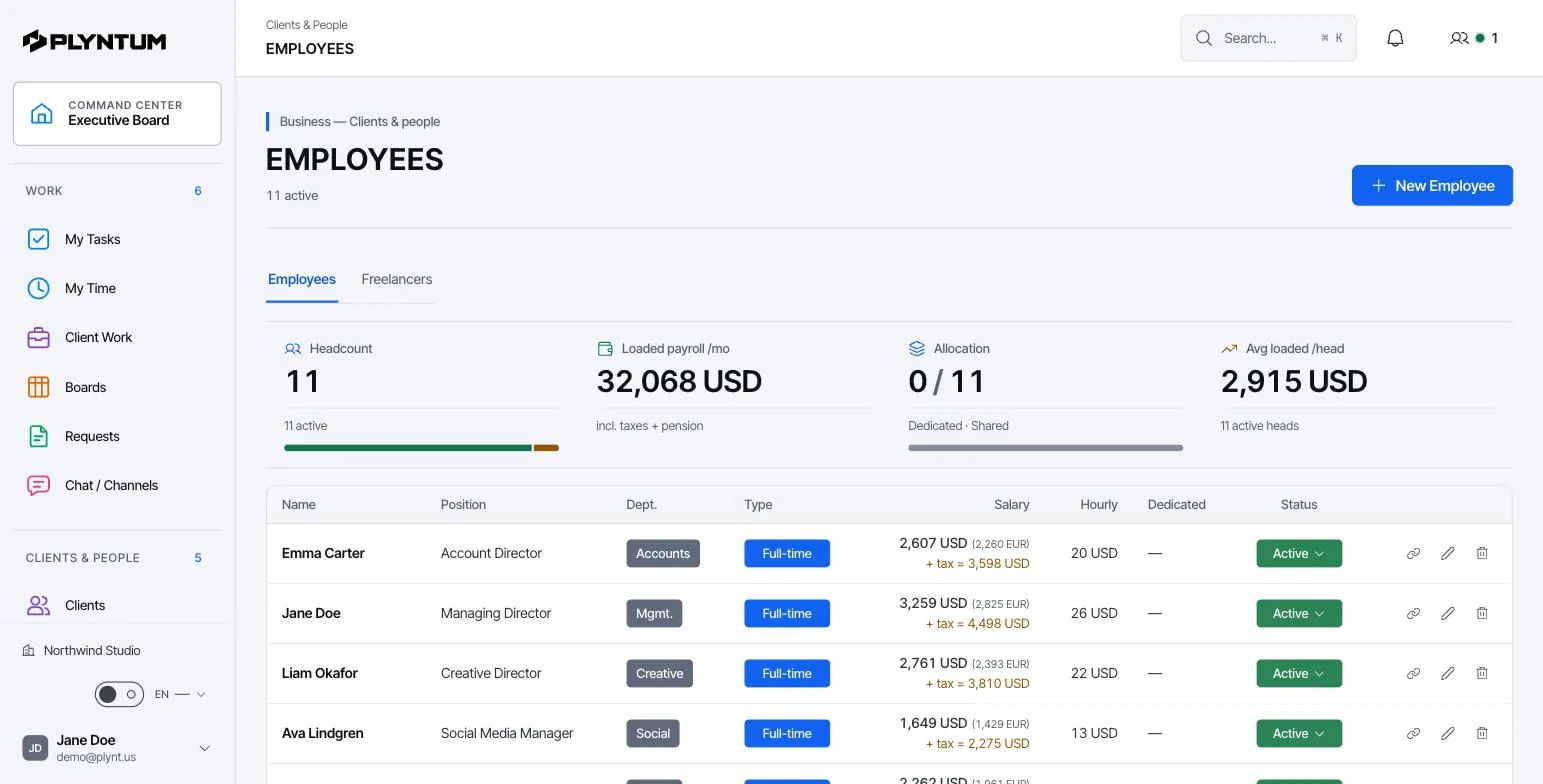
What stays connected.
The details behind the workflow, including what is available and what is still planned.
THE CONNECTION
A new assignment should fit the time a person actually has. Review existing responsibilities, attendance and planned leave before changing the schedule. Managers can discuss priorities with the team while access rules keep sensitive personal and financial information with the appropriate roles.
Explore time capture See work management
People connected to delivery
Know who owns each task and how the next deadline fits their existing workload.
Availability in the same picture
Account for attendance and leave when assigning new work.
The right information for each role
Employees can work with the information they need. Financial records remain restricted to authorized roles.
Also in the system
Employees, external collaborators, teams, attendance, leave, workload and workspace roles.
Further reading: Utilization: the number everyone quotes and few define.
Software vendors use these terms interchangeably, but they answer different questions. Resource management software is the umbrella; capacity planning and resource scheduling are two jobs inside it, and workload management is the day-to-day check on whether the plan is holding.
| Term | The question it answers | Horizon | Typical output |
|---|---|---|---|
| Resource management | Are the right people on the right work, at a cost the work can carry? | Ongoing | Assignments, availability and cost per person |
| Capacity planning | Do we have enough hours for the work we have sold and the work we expect? | Weeks to months | Available hours against demand, by team or role |
| Resource scheduling | Who does which task, and when? | Days to weeks | A dated assignment for each person |
| Workload management | Is anyone overloaded right now? | This week | Open tasks and deadlines per person |
You will also meet resource allocation: the decision itself, this person on this work for these hours. Scheduling adds the dates.
A small service team usually needs them in reverse order: first a clear view of who carries what this week, then a way to check new work against available hours, and only then a longer-range plan. Resource planning software for large firms adds skills matching and forecasting across hundreds of people. Most teams of 5 to 50 never reach that problem.
Capacity planning starts with hours, not headcount. A person on a 40-hour contract does not have 40 hours for client work: leave, public holidays, internal meetings, admin and sales time come off first. The figures below are an example for one week, not a benchmark.
| One week, team of 8 | Hours |
|---|---|
| Contracted hours (8 × 40) | 320 |
| Leave: one person away for 3 days | −24 |
| Internal meetings, admin and sales time across the team | −48 |
| Available for client work | 248 |
| Already allocated to client tasks | 230 |
| Free this week | 18 |
A client asks whether you can start a 30-hour piece of work on Monday. The team total already says no: 18 hours are free. It also hides who has them. In this example, 12 of the 18 free hours sit with one junior analyst, while a senior consultant is allocated 38 hours against 34 available. The real answer is to start part of the work now, move a date, or agree which existing task waits, and to say so before the date is promised, not after.
Repeat the check for the next four weeks, not only this one: a project that starts in three weeks already has a claim on those hours. Two numbers are worth watching every week: available against allocated hours for each person, and the share of available hours that turns into billable work, which is the utilization rate. Planning everyone to 100% of their available hours leaves no room for the request that always arrives mid-week, so keep a buffer. For a longer walk-through, read capacity planning for agencies; the utilization rate calculator runs the numbers for your own team.
In PLYNTUM the inputs sit in one place on every plan: leave is requested and approved as a request, attendance is recorded, and each person’s open tasks and deadlines show on the task boards. On Scale and above, the workload and capacity view brings them together, per person and across the team.
People records, attendance and leave are on every plan; the workload and capacity view starts on Scale. Plans are priced per workspace with members included: Launch $55 a month, Core $150, Scale $450 and Intelligence $1,050, with 20% off for annual billing.
| Capability | Launch and Core | Scale and Intelligence |
|---|---|---|
| Employee and collaborator records | Yes | Yes |
| Attendance and leave, with leave requests and approvals | Yes | Yes |
| Task assignments per person | Yes | Yes |
| Workspace roles | Yes | Yes |
| Workload, capacity and resource planning | — | Yes |
| Portfolio analytics | — | Yes |
| What-if forecasting | — | Yes |
| Custom roles | — | Yes |
For firms that sell time, Core sits between the two. It adds timesheet approval, billable rates and project profitability, so the hours a person logs become cost at their own loaded rate. That turns a view of who is busy into a view of what the work costs. See time tracking and project profitability; current limits are on the pricing page.
- No automatic resource leveling. It does not move tasks or dates to resolve overbooking; a manager decides what moves.
- No skills matrix. People are not matched to work by skill or seniority.
- No HR performance module: no reviews, goals or appraisals.
- No payroll. Attendance and leave are recorded, but pay is calculated in your payroll or accounting system.
- No calendar sync. Availability is not read from Google Calendar or Outlook; integrations are not available today.
AI support for people and operations is in development and is not part of any plan today.
If you need automatic leveling or skills-based staffing across hundreds of people, a dedicated resource planning tool or an enterprise PSA is the better fit. PLYNTUM is built for teams that plan by hand and want the hours and the money next to the plan.
General resource planning tools schedule people; they rarely know what the work is worth. In a service firm the two questions arrive together. An agency needs to know whether a retainer still fits the hours the client pays for; a consultancy needs to know how much of its available time was billable. PLYNTUM keeps assignments, hours and money in the same workspace, so the capacity question and the margin question are answered from the same numbers.
See how it works for agencies and for consulting firms, and read how to measure utilization before you set targets.
How capacity becomes part of planning
Before a date is promised, check who owns the work, what they already carry and when they are away.
Add people and roles
Invite employees and external collaborators to the workspace and give each a role that matches what they need to see.
Record attendance and leave
Attendance and leave sit next to assignments, so availability is part of planning rather than a separate calendar.
Check the workload
Before assigning new work, look at the person’s open tasks and upcoming deadlines.
Assign with context
Give the task to someone who has time. The owner sees the brief and the date; the manager sees how the change affects the rest of the week.
Who uses it
- Managers
- Plan assignments against real availability and discuss priorities with the person before moving a date.
- Employees
- See their own tasks, request leave and work with the information their role allows.
- HR and finance
- Keep personal and financial records restricted to authorized roles.
Available today and in development
| Employee and collaborator recordsMembers: Launch 5, Core 10, Scale 25, Intelligence 50. | Available |
|---|---|
| Attendance and leave | Available |
| Assignments and workload | Available |
| Workspace roles | Available |
| Custom roles | Scale and Intelligence |
| AI support for people and operations | In development |
What it replaces
Availability often lives in a shared calendar, leave in an HR form and assignments in a task tool. A manager has to combine all three before making a promise. PLYNTUM shows them together and keeps sensitive details with the right roles.
- Shared availability calendar
- Leave requests by email or form
- Workload spreadsheet
Your first week
- Invite the team and set roles before anyone opens financial information.
- Enter planned leave for the coming month.
- Check next week’s assignments against availability before confirming new dates.
Connected areas
Common questions
Start with the work that keeps getting stuck.
Bring one project into a connected workspace. See the work, the people and the cost together.