
Free business trip report and expense template (Excel)
Download a free business trip report in Excel, in English and Georgian. One sheet records who travelled, where, why and who approved it, lists every expense with its receipt, converts other currencies, totals the costs by category and works out, after the advance, what the company owes the employee or what the employee returns.
Free, no sign-up · .xlsx with formulas, no macros · receipts, exchange rates and the balance after the advance · opens in Google Sheets and Numbers
.xlsx with formulas, no macros · receipts, exchange rates and the balance after the advance · opens in Google Sheets and Numbers
Was the trip for a client project? In PLYNTUM payments and direct expenses are recorded on the client or project they belong to, in more than one currency if needed, so the trip shows as that project’s cost next to its hours.
What is in the workbook
The file, plyntum-business-trip-expense-report.xlsx, has two sheets. Trip report is the one the employee fills in:
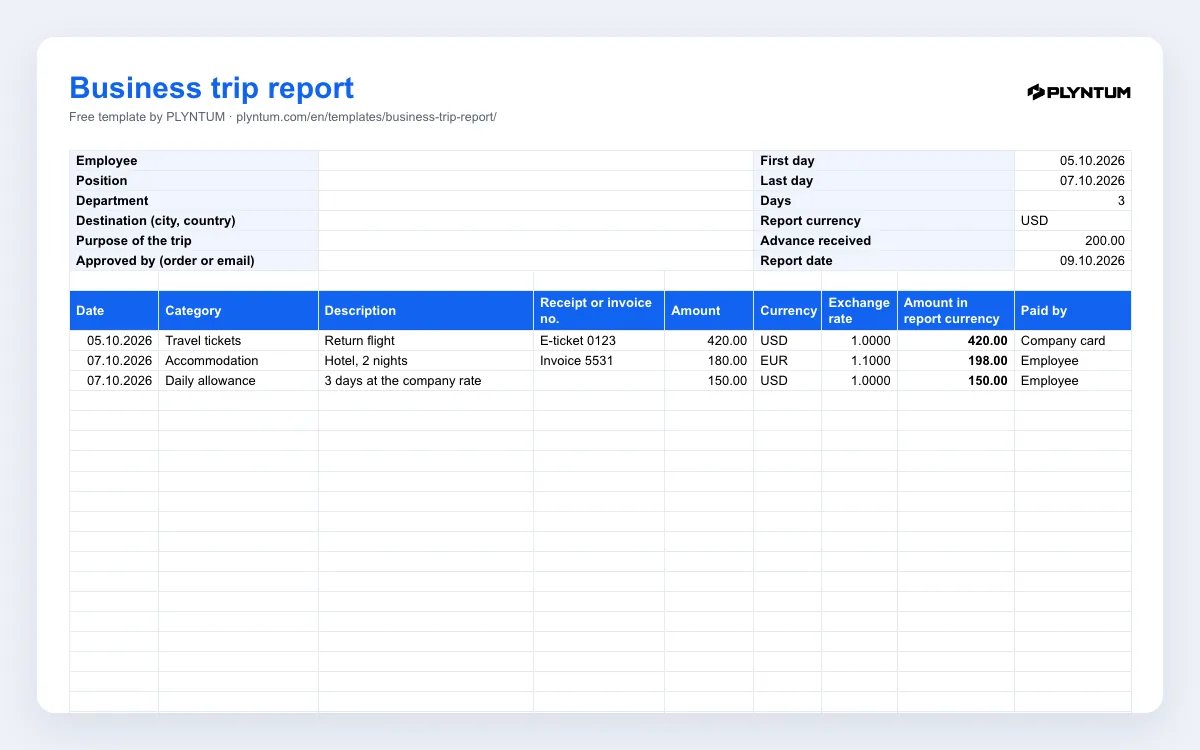
- Top block: employee, position, department, destination, purpose of the trip and who approved it; first and last day (the number of days calculates itself), report currency, advance received and report date.
- Expenses: twenty lines with date, category, description, receipt or invoice number, amount, currency, exchange rate, amount in the report currency, and who paid: the employee or the company card. Category and “Paid by” are drop-down lists.
- Totals: expenses by category, the total, the part paid with the company card and the part the employee paid.
- Balance: what the employee paid minus the advance, a line that says who owes whom, and a check that turns red if a line has no “Paid by”.
- Results and signatures: two or three sentences on what the trip achieved; then the employee, the approving manager and the accountant sign.
The second sheet, How to use, repeats the steps below. Formulas only, no macros; the workbook opens in Excel, Google Sheets and Apple Numbers.
How to fill it in
- Before the trip: fill in the top block and the advance, if there is one.
- During the trip: keep every receipt, ticket and invoice, or photograph it the same day.
- After the trip: one line per expense, with the document number. A daily allowance is one line for the whole trip.
- Other currencies: enter the amount, the currency and the exchange rate to the report currency. Use the rate your accountant uses and agree it before you travel; for the report currency itself the rate is 1.
- Check the balance: a positive balance is what the company pays back, a negative one is what the employee returns.
- Results and signatures: write what was agreed and what happens next, sign, and pass the report to the manager and the accountant.
The example lines in the English file: a 420.00 USD return flight paid with the company card, a 180 EUR hotel paid by the employee at an example rate of 1.10, and a 150.00 USD daily allowance. Total expenses are 768.00 USD, of which the employee paid 348.00; after a 200.00 USD advance the company owes the employee 148.00.
Daily allowance, receipts and tax
Each company sets its own travel policy: whether it pays a daily allowance or reimburses meals against receipts, the rates and limits, and which documents it accepts. Write the policy down once and attach it to the report form, so every trip is settled the same way. If the daily allowance is meant to cover meals, do not claim meals separately.
How a daily allowance or a reimbursement is taxed, and which documents your accountant needs to book an expense, depend on the tax rules that apply to your company. This template does not answer those questions: check with your accountant before you set the rates. The top block has a line for the order or written approval behind the trip, if your company issues one.
A report, not just receipts
The last block asks for two or three sentences on results: who you met, what was agreed, what happens next. It is short on purpose. A report that only lists costs tells the manager what the trip cost but not whether it was worth it, and the next trip is easier to approve when the last one has a result on record.
Where PLYNTUM fits
Before the trip, a request can go to a manager in PLYNTUM as a general approval, and the decision stays with the request. After it, payments, purchases and direct expenses are recorded against the client or project they belong to, in more than one currency if needed, so a trip for a client project shows up as that project’s direct cost next to the hours logged on it. There is no separate expense-claim request type, so the employee still settles the trip with the company in this workbook. How requests and approvals work.
Related pages
Common questions
Start with the work that keeps getting stuck.
Bring one project into a connected workspace. See the work, the people and the cost together.