
Jira alternatives for client work: six options and where PLYNTUM fits
Jira is a work-tracking tool that began with software teams and is free for up to 10 users. Agencies look for an alternative when they need timesheets, invoices, client balances and profit per project, which Jira’s pricing page does not list. ClickUp, monday.com and Asana replace it as task tools; Teamwork.com, Productive and PLYNTUM add time, invoices and profitability; Harvest adds time and invoices next to Jira.
Key facts
- Jira pricing
- Free for up to 10 users. For 10 users, Standard is $950 a year billed annually, or $9.70 per user a month billed monthly; Premium is $1,950 a year, or $19.60 per user a month, checked 24 October 2026.
- What Jira lacks for client work
- Its pricing page lists no timesheets, invoices, budgets or client billing. People can log time on a work item.
- PLYNTUM for 10 members
- PLYNTUM Core costs $150 a month for a workspace of 10 members, or $120 a month billed annually.
- Interface language
- PLYNTUM works in Georgian and English; Georgian is not among Jira’s supported languages.
At a glance
Prices come from each vendor’s own pages, read on 24 October 2026; monday.com on 25 September 2026. Annual billing unless stated; taxes excluded. Feature scope differs — the comparison pages have the detail. Jira prices were checked on 24 October 2026.
| Tool | Best for | Cost for 10 people | Georgian interface |
|---|---|---|---|
| Jirathe tool you are replacing | Baseline: your current tool | Free for up to 10 users. Jira Standard for 10 users: $950 a year billed annually ($97 a month billed monthly, $9.70 per user); Premium: $1,950 a year billed annually ($196 a month billed monthly, $19.60 per user). | No; Georgian is not among its supported languages |
| ClickUp | Tasks, docs, chat and sprints in one app | ClickUp Business for 10 users: $170 a month, billed annually. Timesheet approvals are on Enterprise, priced on request. | Not found in the information we read |
| monday.com | Boards with more views and automation | monday.com Pro for 10 seats: $190 a month, billed annually. | Not among the 15 interface languages |
| Asana | More structure for tasks and projects; billing elsewhere | Asana Advanced for 10 users: $249.90 a month, billed annually, plus the Timesheets & Budgets add-on, which has no published price. | Not among the 14 display languages |
| Teamwork.com | Client projects invoiced from logged time | Teamwork.com Accelerate for 10 users: $249.90 a month, billed annually. | Not stated on the pages we read |
| Productive | Agencies that want delivery and finance in one tool | Productive Professional for 10 users: $250 a month, billed annually. | No; the interface is in English only |
| Harvest | Keeping Jira and adding time tracking and invoices | 10 seats, annual billing: Teams starts at $90/month, Enterprise at $140/month. Forecast adds $50/month for 10 people (Forecast price read 25 September 2026). These are base estimates; usage fees are excluded. | Not found in the information we read |
| PLYNTUM | Projects, hours, invoices and profit per client in one workspace | PLYNTUM Core: $150 per month, or $120 per month billed annually ($1,440 paid yearly), for up to 10 members. | Georgian and English |
Why service firms outgrow Jira for client work
Atlassian says Jira began in 2002 as a work-tracking tool for software teams and is now also used by marketing, IT, operations, design and product teams. It shows the same work as a backlog, list, board, timeline, calendar or summary, supports Scrum and Kanban boards, and connects to thousands of apps. Its pricing page lists a Free plan for up to 10 users; for 10 users, Standard is $950 a year and Premium $1,950 a year billed annually, or $9.70 and $19.60 per user a month billed monthly (checked 24 October 2026). For tracking work, that is hard to beat. Teams that sell their time to clients usually leave for one of these reasons.
- Hours are logged, not managed. Jira lets people log time on a work item once an admin has turned time tracking on, and it has a time tracking report. Weekly timesheets and their approval come from Marketplace apps such as Timesheets by Tempo; Jira’s own pricing page lists no timesheets.
- No invoices. Jira’s pricing page lists no invoices, client billing or receivables. The invoice is written in another tool, from hours copied out of Jira.
- No money on the project. The pricing page lists no cost rates, budgets or project profitability, so Jira alone cannot tell you what a client earns you.
- Clients as guests. From Standard, Jira lets you invite people outside your organization as guests without a paid seat. A guest can follow the work, but there are no invoices or balances in Jira to show them.
- The language. Georgian is not among Jira’s supported languages. PLYNTUM works in Georgian and English.
If your team builds software and does not bill clients by the hour, Jira is probably still the right tool.
How to choose a Jira alternative
- Do you build software? Keep Jira for the backlog and sprints, and add a tool for time and money next to it. Harvest puts a timer inside Jira issues; PLYNTUM runs alongside Jira with no integration today.
- Do you only need a simpler task tool? ClickUp, monday.com and Asana replace Jira’s boards and timelines. Invoices stay elsewhere.
- Do you bill for time? Then timesheets and invoices matter more than views. Teamwork.com (from Accelerate), Harvest and PLYNTUM include invoicing in the plans named below, and Productive lists invoicing among its finance features.
- Do you need to know what each client costs? That takes hours recorded against tasks and a cost for each person. Harvest reports profitability on Enterprise, Teamwork.com from Optimize, and PLYNTUM from Core.
- How big is the team? Jira is free up to 10 users. Past that, compare monthly totals, not per-user prices.
- What language does the team work in? Check the interface languages with each vendor before you commit.
Prices in this text are the vendors’ own, checked 24 October 2026 (monday.com on 25 September 2026), excluding tax and on annual billing unless stated; 10-person costs are arithmetic, not quotes. Nothing is ranked, and PLYNTUM, which we make, has its own section.
Six Jira alternatives
ClickUp
ClickUp puts tasks, docs, chat, Kanban boards and sprint management in one app. There is a Free Forever plan; ClickUp Core is $9 and Business $17 per user a month billed yearly ($12 and $25 billed monthly). Time tracking appears in the Free Forever plan list, though the plan comparison marks it “Trial” on Free; it is included from Core. Timesheets come with Business, and timesheet approval with Enterprise (price on request) and Max ($100 per user a month billed yearly). The pricing page does not mention invoicing (checked 24 October 2026). PLYNTUM vs ClickUp · ClickUp alternatives
Best for: teams that want sprints and tasks in a broader all-in-one tool.
monday.com
monday.com Work Management runs projects and tasks on flexible boards. There is a free plan for up to 2 seats; Basic is $9, Standard $12 and Pro $19 per seat a month billed annually, with seats sold from 3 (US-dollar prices checked 25 September 2026). The pricing page states that the final price depends on the billing country. Time tracking is on Pro. The Work Management plans list no invoices; quotes and invoices appear in the separate monday CRM plans (checked 24 October 2026). PLYNTUM vs monday.com · monday.com alternatives
Best for: teams that like boards but want more views and automation.
Asana
Asana is a work and project management platform with a free Personal plan for up to 2 users. Starter is $10.99 and Advanced $24.99 per user a month billed annually ($13.49 and $30.49 billed monthly). Native time tracking is on Advanced; timesheets come with the Timesheets and Budgets add-on, available on Starter, Advanced and Enterprise and billed separately, with no price shown on the pricing page. The pricing page does not mention invoices (checked 24 October 2026). PLYNTUM vs Asana · Asana alternatives
Best for: non-software teams that want more structure than Jira, with billing kept elsewhere.
Teamwork.com
Teamwork.com is project software for client work. The Free plan covers up to 5 users; Basics is $9.99 (3-user minimum) and Accelerate $24.99 (5-user minimum) per user a month billed yearly. Client users can be invited into projects from Basics, timesheets and client invoices from logged time come with Accelerate, and timesheet approval and profitability insights are listed from Optimize, priced on request (checked 24 October 2026). PLYNTUM vs Teamwork.com · Teamwork.com alternatives
Best for: client-services teams that invoice from logged time.
Productive
Productive is agency software for resources, projects and finances. Essential is $10 and Professional $25 per user a month billed yearly ($12 and $29 billed monthly), with a 3-seat minimum. Essential includes time tracking, budgeting, resource planning and expense management; Professional adds billable time approvals, rate cards, and HRIS and invoicing integrations (checked 24 October 2026). PLYNTUM vs Productive · Productive alternatives
Best for: agencies that want resourcing, delivery and finance in one tool.
Harvest, next to Jira
Harvest is time tracking with invoicing, and its Jira integration adds a Harvest timer to every Jira issue. You can keep Jira for the work and use Harvest for hours and invoices. The Free plan has 1 seat and 2 projects. Teams starts at $9 per seat a month billed annually ($108 a year) and Enterprise at $14 ($168 a year), plus usage-based fees for additional invoices, projects, clients and tasks; timesheet approval and profitability reporting are on Enterprise (checked 24 October 2026). PLYNTUM vs Harvest · Harvest alternatives
Best for: keeping Jira and adding time tracking and invoicing.
Where PLYNTUM fits, and where it does not
PLYNTUM is business management software for agencies and service companies: projects and tasks, clients, people, recorded time, invoices, expenses and receivables in one workspace.
- Tasks you can plan. Tasks and subtasks have an owner, a deadline and dependencies, in list, board, calendar, week and timeline views. See projects and tasks.
- Hours on the task. People record time against tasks on every plan, with a start/stop timer or by hand in a weekly timesheet; nothing is captured automatically. From Core, people submit their week, a manager approves or rejects it, and submitted and approved weeks lock. See time tracking and timesheet approval.
- From hours to money. Invoices and receivables are on every plan, and Core adds recurring invoices, project profitability and draft invoices from approved time: approved, billable hours are priced at the billable rates set in PLYNTUM, and you edit the draft before you issue it. Payments are recorded by hand.
- Clients. From Core, each client can get a private, read-only portal link to their projects, invoices, payments and balance, with no account or password.
- Language. PLYNTUM works in Georgian and English.
Where it does not fit.
- It is not an issue tracker. There are no sprints, story points, velocity charts or code links.
- No Jira connection today. PLYNTUM has no Jira, GitHub or GitLab integration; an API and webhooks are planned for Scale. It has no integrations marketplace, and rule-based automation is planned, not available.
- It costs more than Jira for tracking work. For 10 people, Core is $1,440 a year billed annually, against $950 for Jira Standard and nothing for Jira Free.
- One approval step. Each week has a single manager approval, with no multi-level sign-off.
Core costs $150 a month for up to 10 members, or $120 a month billed annually. See pricing.
When to stay with Jira
- You build software. Backlogs, sprints, Scrum and Kanban boards belong in Jira. If you also bill clients, keep the tickets in Jira and run the business side next to it, as our page for software development companies describes.
- Your process lives in automation and apps. If Jira automation and Marketplace apps carry your workflow, check each one before you move.
- You are 10 people or fewer and only track work. Jira’s Free plan costs nothing.
- You do not bill for time. If hours and invoices do not matter, a heavier tool adds cost without much benefit.
Moving from Jira
There is no Jira importer in PLYNTUM, and its CSV import covers clients, employees and expenses only; projects and tasks are set up by hand. So move one client at a time.
- Decide what stays in Jira. Software teams keep tickets in Jira and create PLYNTUM tasks for the phases or features they priced.
- Keep a copy of your Jira data. Check Jira’s export options for your plan before you change anything.
- Start with one client. Create the client and the project in PLYNTUM and rebuild the open work as tasks.
- Record time from day one against those tasks, and raise the client’s next invoice from PLYNTUM.
- Compare after a month: hours, invoice and margin for that client. Then decide on the rest.
Start on Launch’s 7-day trial; timesheet approval, profitability and the client portal need Core. For help planning the move, write to us.
Sources
Every price was checked on the vendor’s own pricing page on the date shown next to it. If something has changed, tell us at info@plyntum.com and we will correct it.
- Jira pricing (checked 24 October 2026)
- ClickUp pricing (checked 24 October 2026)
- monday.com pricing (checked 25 September 2026)
- Asana pricing (checked 24 October 2026)
- Teamwork.com pricing (checked 24 October 2026)
- Productive pricing (checked 24 October 2026)
- Harvest pricing (checked 24 October 2026)
Related pages
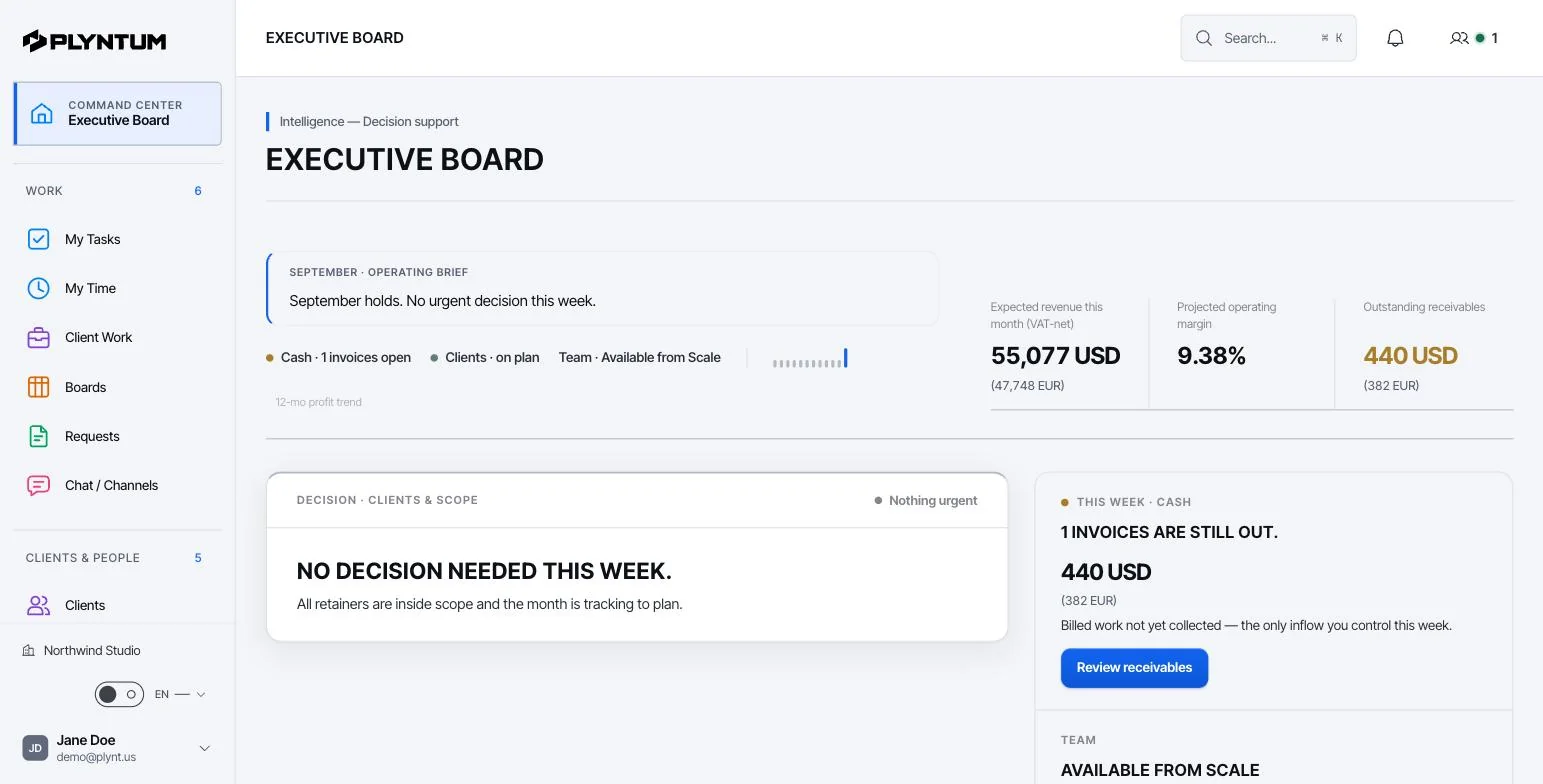
How it looks in PLYNTUM.
Screens from a demo workspace with sample data, as the product looks today.
Common questions
Start with the work that keeps getting stuck.
Bring one project into a connected workspace. See the work, the people and the cost together.