
Free account reconciliation statement template (Excel)
Download a free reconciliation statement in Excel, in English and Georgian. Two companies list what they invoiced and paid each other over a period, side by side, and the file works out the closing balance on each side, the difference between the two sets of records and who owes whom. When the difference is zero, both sides sign.
Free, no sign-up · .xlsx with formulas, no macros · both sides and a difference check · opens in Google Sheets and Numbers
.xlsx with formulas, no macros · both sides and a difference check · opens in Google Sheets and Numbers
Searching email and bank statements for one client’s invoices? In PLYNTUM invoices, payments and the outstanding balance sit on each client on every plan, so your side of the statement is one view.
What is in the workbook
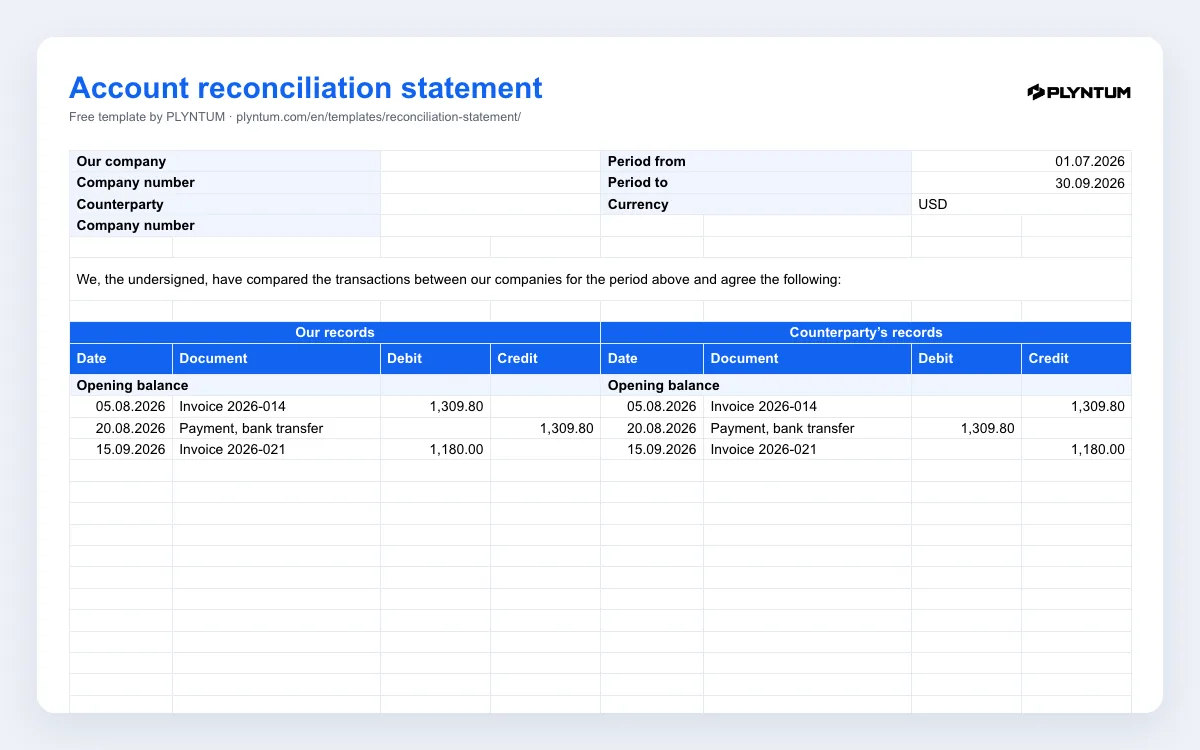
The file, plyntum-reconciliation-statement.xlsx, has two sheets. Reconciliation is the statement itself:
- Top block: both companies with their company numbers, the period from and to, and the currency.
- Two sets of records side by side: your records on the left, the counterparty’s on the right. Each side has date, document, debit and credit, an opening balance, the turnover for the period and the closing balance.
- The check: the difference between the two sets of records, which turns red when it is not zero.
- The result: the balance date, who owes whom and the amount outstanding, written out by formula.
- Signatures: director, accountant, date and stamp for each company.
The second sheet, How to use, repeats the steps below. The workbook uses formulas only, with no macros, and opens in Excel, Google Sheets and Apple Numbers.
How debit and credit work here
Each company fills in the statement from its own books, so the two sides mirror each other. On your side, debit what you invoiced or delivered to the counterparty and anything you paid them; credit what they paid you and anything they invoiced to you. The counterparty does the same from its side, so your invoice appears in its credit column and its payment to you in its debit column.
An example: you invoiced 1,309.80 on 5 August, the client paid it on 20 August, and you invoiced 1,180.00 on 15 September. Your side shows debits of 2,489.80 and a credit of 1,309.80, so your closing balance is a debit of 1,180.00. The client’s side shows the same amounts the other way round, a credit balance of 1,180.00. The difference is zero, and the statement says that the counterparty owes your company 1,180.00. These are the example lines in the file.
How to reconcile in five steps
- Agree the period and the opening balance. Usually a quarter or a year. If the last period was reconciled, its closing balance is this period’s opening balance.
- Fill in your side from your books: every invoice, payment, credit note or offset with this counterparty in the period.
- Send the file to the counterparty and ask them to fill in their side from their own books, not by copying yours.
- If there is a difference, find it. Compare line by line. Typical causes: an invoice one side has not booked yet, a payment in transit at the end of the period, a document dated in another period, or a payment booked against the wrong invoice.
- Sign when the difference is zero: the director and the accountant of each company, in two copies.
When companies reconcile, and what the statement is not
Companies reconcile with their main clients and suppliers at the end of a quarter or a year, before an audit, before closing a contract, or when a payment is disputed. A signed statement records that both sides agreed the balance on a date; how it is used in your accounts or in a dispute is a question for your accountant or lawyer.
The template follows a structure commonly used for reconciliation statements between companies. It is not an official state form, and it does not replace your accounting records or software.
Where PLYNTUM fits
Your side of the statement is a list of invoices and payments with one client. In PLYNTUM invoices, payments and the outstanding balance sit on each client on every plan, so that list is a view rather than a search through email and bank statements. PLYNTUM is not accounting software: it has no general ledger or bank reconciliation, and the counterparty’s side still comes from their books. Use the totals to fill in this workbook, and leave the official records to your accountant.
Related pages
Common questions
Start with the work that keeps getting stuck.
Bring one project into a connected workspace. See the work, the people and the cost together.