
PLYNTUM vs monday.com
How PLYNTUM and monday.com differ in price, scope and language, with prices checked against monday.com’s own pages on 25 September 2026.
PLYNTUM or monday.com: the short answer
monday.com Pro costs $19 per seat on annual billing, $190 a month for ten seats; PLYNTUM Core costs $120 for 10 members. monday.com is a general work platform and sells its CRM as a separate product; time approval is not in its plans. PLYNTUM is built for client work — logged time, invoices, receivables and several companies in one place. Pick monday.com for a flexible board tool; pick PLYNTUM when hours have to reconcile with invoices.
Last checked: 25 September 2026.
monday.com and PLYNTUM at a glance
| Differentiator | monday.com | PLYNTUM |
|---|---|---|
| Pricing model | Per seat, sold in groups from 3 seats; free plan up to 2 seats | Per workspace, members included: Launch 5, Core 10, Scale 25, Intelligence 50 |
| Cost for 10 people a month | $190 a month on Pro, billed annually | $120 a month on Core, billed annually; $150 billed monthly |
| Time tracking | Time Tracking column on Pro and Enterprise | All plans; private desktop capture is in development |
| Invoicing and receivables | Not listed in the plans | Basic invoices and receivables on all plans; draft invoices from approved time and recurring invoices from Core |
| Project profitability | Not listed in the Work Management plans | From Core: logged hours at each person’s cost plus direct expenses, set against the project value |
| Georgian interface | Not among the 15 interface languages | Georgian and English |
List prices from each vendor’s own pages, read on 25 September 2026; annual billing unless the cell says otherwise, before tax. The full feature table and the sources are further down.
From PLYNTUM’s first workspace
Lost & Found, an 18-person creative agency in Tbilisi, ran its work across six tools (Asana, Miro, Discord, Slack, Excel and Notion) before it moved fully to PLYNTUM in 10 days.
“PLYNTUM radically simplified prioritisation and time management. It is incredibly comfortable when every tool and every piece of information you need for the work is in one place.”
Disclosure: Lost & Found’s CEO, Nikoloz Norieli, is PLYNTUM’s founder, and the agency was PLYNTUM’s first workspace. This is not an independent review. Read the Lost & Found story
monday.com describes itself as an AI work platform where people and AI agents work as one team. Its Work Management product covers projects and tasks.
Per seat per month, billed annually: Basic $9, Standard $12, Pro $19; Enterprise on request. Minimum 3 seats; monday.com’s seat picker sets the exact seat counts. Free plan for up to 2 seats; 14-day Pro trial.
monday.com Pro for 10 seats: $190 a month, billed annually.
PLYNTUM is business management software for agencies and service companies. It connects projects, clients, people, logged time and operational finance in one place.
- Launch
- $55 / month5 members included$44 / month, billed annually$528 paid yearly
- Core
- $150 / month10 members included$120 / month, billed annually$1,440 paid yearly
- Scale
- $450 / month25 members included$360 / month, billed annually$4,320 paid yearly
- Intelligence
- $1,050 / month50 members included$840 / month, billed annually$10,080 paid yearly
One subscription per workspace. Only Launch includes a 7-day free trial, with no automatic paid conversion. Capabilities differ by plan and role. CRM core is released; AI and CRM extensions have separate rollout gates.
Compare all plan capabilitiesPLYNTUM Core: $150 per month, or $120 per month billed annually ($1,440 paid yearly), for up to 10 members.
Feature by feature
| Area | monday.com | PLYNTUM |
|---|---|---|
| Pricing basis | Per seat: Basic $9, Standard $12, Pro $19 (annual billing) | Per workspace: Core costs $150 per month for up to 10 members; $120 per month with annual billing |
| Projects and tasks | All plans | All plans |
| Time tracking | Time Tracking column on Pro and Enterprise | All plans; private desktop capture is in development |
| Time approval | Not listed in the plans | Manager timesheet approval from Core |
| Invoicing | Not listed in the plans | Basic invoices and receivables on all plans; draft invoices from approved time and recurring invoices from Core |
| Expenses | Not listed in the plans | All plans |
| Leave requests | Not listed in the plans | Leave requests with approval on all plans |
| Client access | Guests: four count as one seat on Standard; unlimited on Pro | Scoped client portal from Core |
| Several companies | Not stated on the pages we read | A separate workspace per company, each with its own plan; one sign-in |
| Sales CRM | A separate product, monday CRM | Released core; plan, role and permission limits apply |
| Georgian interface | Not among the 15 interface languages | Georgian and English |
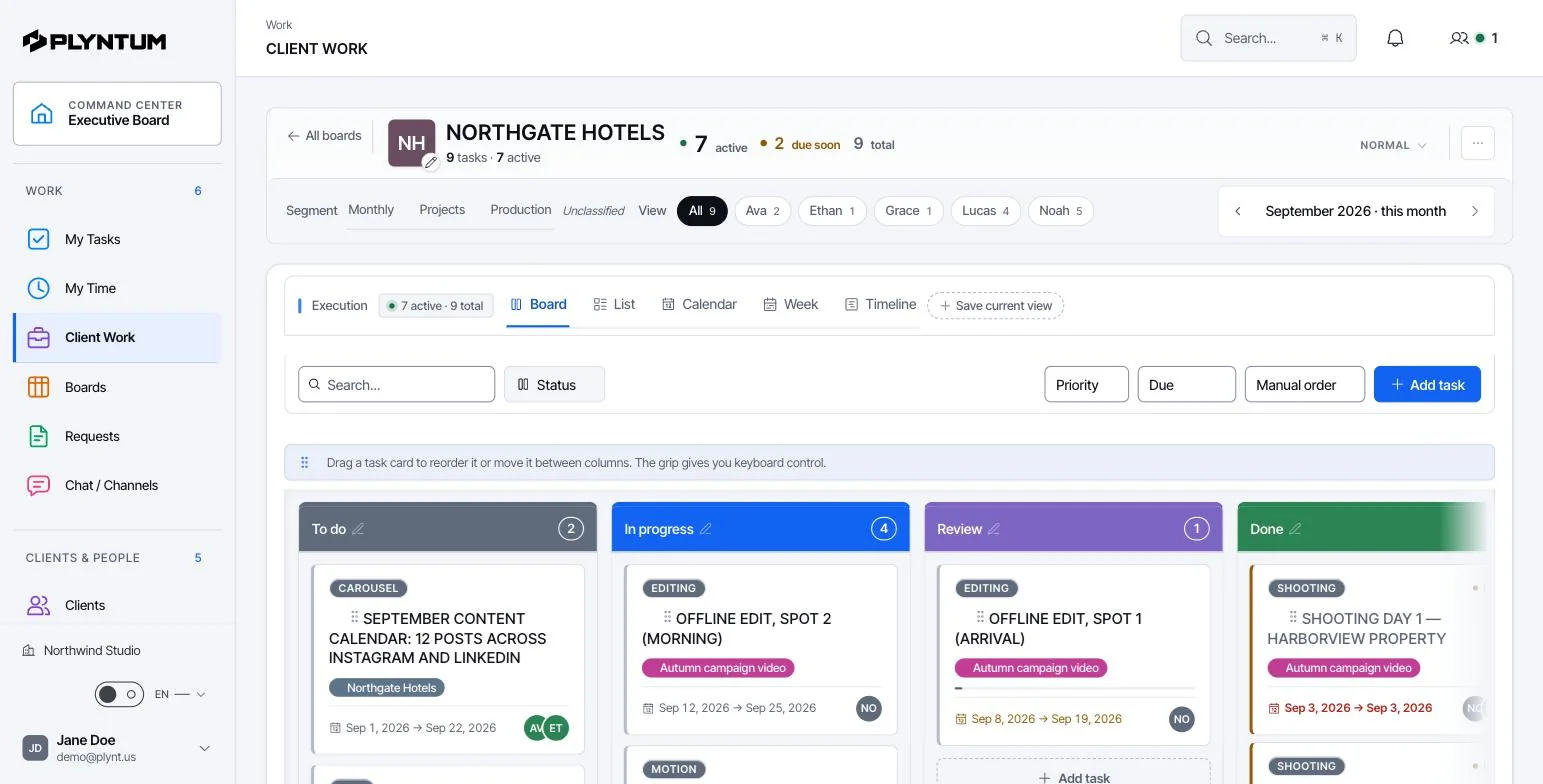
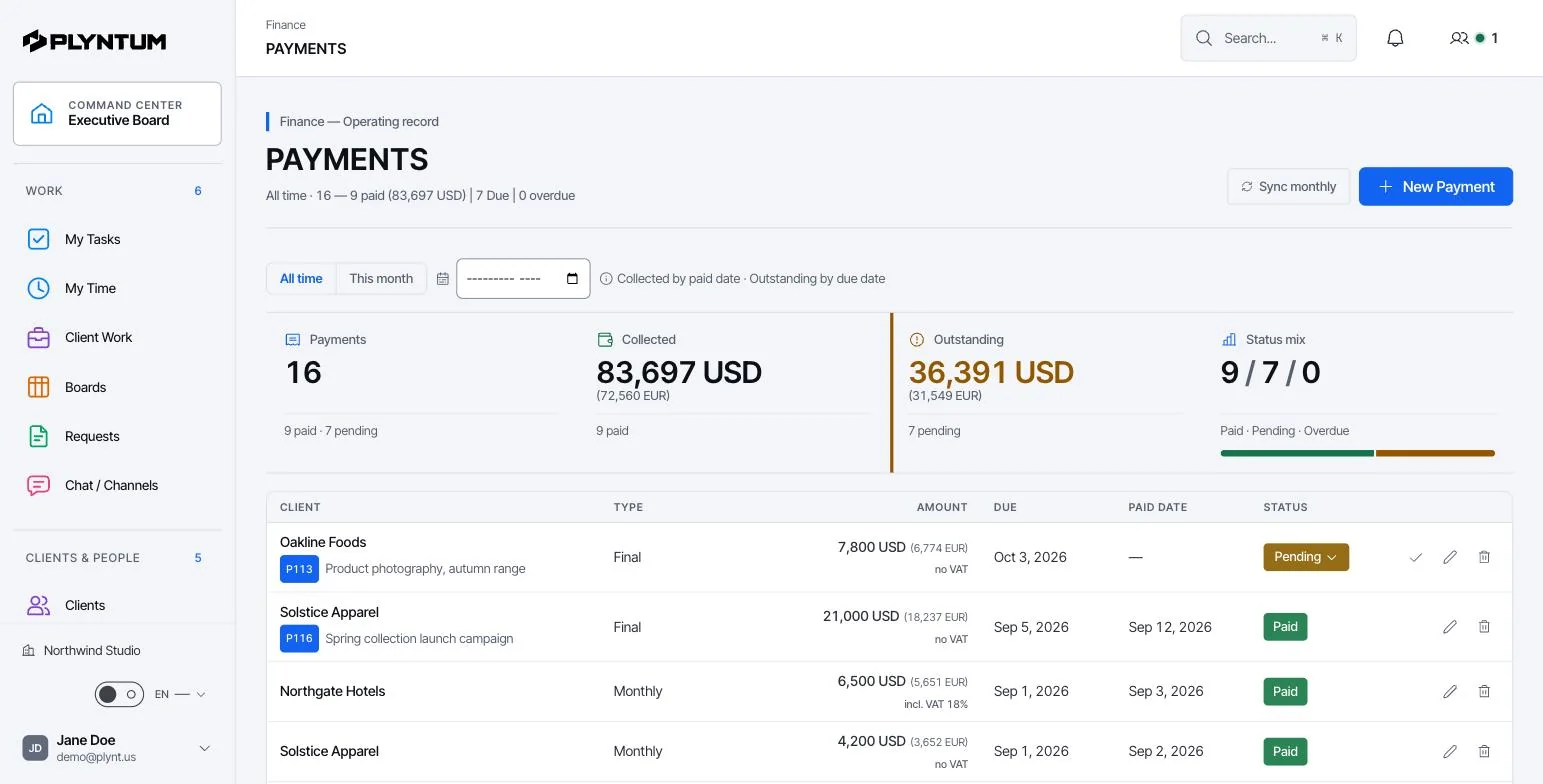
How it looks in PLYNTUM.
Screens from a demo workspace with sample data, as the product looks today.
Where monday.com is stronger
- A general work platform used for many kinds of work, with a free plan for up to 2 seats.
- Workload view on Pro and advanced resource management on Enterprise.
- A separate CRM product if you need a sales pipeline today.
Where PLYNTUM fits better
- Invoices, expenses and receivables are part of the workspace. They are not listed in the monday.com Work Management plans.
- Manual time tracking is included in every PLYNTUM plan; manager timesheet approvals start with Core. On monday.com time tracking is a Pro and Enterprise column.
- A flat price per workspace and a Georgian interface.
A month of client work in monday.com and PLYNTUM
- Week 1: you set up the client. In monday.com you configure a flexible board yourself. In PLYNTUM the client’s project comes with stages, fields and time from the start.
- Weeks 2–4: the team logs time. In monday.com time tracking is a column on Pro and Enterprise, and time approval is not listed in the plans. PLYNTUM tracks time on every plan and adds manager approval from Core.
- Month end: monday.com Work Management lists no invoices or expenses, so billing happens in another tool. In PLYNTUM the invoice is raised from the same project and the payment is tracked as a receivable.
monday.com pricing for 5, 10 and 25 people, next to PLYNTUM
| People | monday.com Pro | PLYNTUM |
|---|---|---|
| 5 | $95 a month$1,140 a year | $44 a month$528 a yearLaunch |
| 10 | $190 a month$2,280 a year | $120 a month$1,440 a yearCore |
| 25 | $475 a month$5,700 a year | $360 a month$4,320 a yearScale |
monday.com sells seats in groups; a team between two groups pays for the larger one. Published base prices on annual billing, before tax, checked on 25 September 2026. The PLYNTUM plan is chosen by team size; time approval and the client portal start with Core.
What to confirm with monday.com
- Which plan you need for time tracking: the Time Tracking column is on Pro, $19 per seat on annual billing.
- How seats are sold: in groups with a minimum of three, so a team between two groups pays for the larger one.
- Whether you need a sales pipeline now: monday CRM is a separate product with its own price.
Before you switch
Move one client’s boards first and map their columns to PLYNTUM board stages and fields. Start recording invoices and payments in PLYNTUM from the beginning of a billing month, so the figures are complete.
Plan your moveCommon questions
Sources
Prices checked on 25 September 2026. Feature descriptions were reviewed on 11–12 September; pricing-related conditions were updated in this review. Competitor prices generally exclude tax; PLYNTUM uses its catalog amounts. Taxes are not normalized to one country. Confirm taxes, billing terms and the payable total with each vendor before deciding. If something has changed, tell us at info@plyntum.com.
Other comparisons
Start with the work that keeps getting stuck.
Bring one project into a connected workspace. See the work, the people and the cost together.