Business management software for agencies and service firms
PLYNTUM is business management software for agencies and service firms. Projects, people, tracked time and finances sit in one workspace, not spread across separate tools such as Asana, Slack, Notion and Excel. Your team knows what to do next, and you can see what the work costs.
7 days free, no card needed. Below: seven everyday situations and what changes in PLYNTUM.
Seven everyday situations, and what changes in PLYNTUM
01 / 07
The request got lost. The deadline didn’t.
Client: change requested
Owner: still unassigned
Due today. No update.
A commitment with no one accountable.
Work · Clients
PLYNTUM / 01
A task with an owner.
Update landing page
OwnerNino
Due18 SEP
Assigned · In progress
Requests become assigned work.
The request got lost. The deadline didn’t.
Monday, 09:15. The client asks for a change in chat. By Friday, everyone thinks someone else is doing it.
PLYNTUM Keep the request, responsible person and deadline together in PLYNTUM. The next step is visible to the team.
02 / 07
More work. Same deadline.
4+2
planned tasks / extra requests
Landing pageNew language?Extra screen?
2 extra tasks. Not in the plan.
Clients · Projects
PLYNTUM / 02
New work. Updated plan.
4+2
planned tasks / extra requests
Landing pageNew languageExtra screen
6 tasks · Plan updated
Changes stay with the project.
More work. Same deadline.
The client adds two deliverables. The old deadline stays. Nobody has added the extra work to the plan.
PLYNTUM Record the added tasks in the same project. Review the time, owners and delivery date before making the next commitment.
03 / 07
Already overloaded. Assigned again.
Nino140%
Giorgi40%
40% above capacity. Deadline at risk.
People · Work
PLYNTUM / 03
Work fits the team.
Nino90%
Giorgi90%
Work redistributed
Check capacity before saying yes.
Already overloaded. Assigned again.
A new project arrives. The person you usually assign it to is already full, while another teammate has room.
PLYNTUM See assignments and availability together. Redistribute the work before another deadline is at risk.
04 / 07
Worked all day. Logged only part.
02:45only this much logged
Unlinked activity?
03:30 of client work missing
Time · People
PLYNTUM / 04
The missing hours are accounted for.
06:15total reviewed work
Website / Design
02:45 + 03:30 recovered = 06:15
Logged time stays with the work.
Worked all day. Logged only part.
Friday afternoon. Only 2 hours 45 minutes made it into the timesheet. Another 3 hours 30 minutes of client work was left out.
PLYNTUM Review the missing activity and link it to the project in PLYNTUM. In this example, adding 3 hours 30 minutes brings reviewed work to 6 hours 15 minutes.
05 / 07
Project delivered. Profit unknown.
Project value$8,000
Work?Direct expenses?
Costs missing. Margin unknown.
Finance · Analytics
PLYNTUM / 05
See what the project leaves.
Before company overhead$2,800
Work$4,200Direct expenses$1,000
$8,000 − $5,200 = $2,800
Know the cost behind the result.
Project delivered. Profit unknown.
The project brings in $8,000. It looks successful, until you count the hours and direct expenses.
PLYNTUM Put reviewed effort, delivery costs and project revenue in one view. See the remaining amount before company overhead.
06 / 07
Invoice sent. Money still missing.
Invoice sent$8,000
Salary day. Cash available??
Finance · Clients
PLYNTUM / 06
Know what is still due.
Collected$4,000
Still due$4,000
Collected and outstanding, separately.
Invoice sent. Money still missing.
The invoice is sent. Salaries are due. Half the project payment still hasn’t reached the bank.
PLYNTUM Separate collected payments from receivables. See the client and project behind each outstanding amount.
07 / 07
Costs went up. Nobody knows why.
Project?
120 hours?
$5,200?
Rising cost. No clear cause.
Analytics · Work · Finance
PLYNTUM / 07
One result. Visible records.
Project
120 hours
$5,200
The same project. Connected records.
Find the reason behind the number.
Costs went up. Nobody knows why.
A project is slipping. The task board, time report and expense sheet each tell only part of the story.
PLYNTUM Review the project, its time and its costs in the same workspace. Follow the result back to the records that explain it.
01 / 07 · Work · Clients
The request got lost. The deadline didn’t.
Monday, 09:15. The client asks for a change in chat. By Friday, everyone thinks someone else is doing it.
WITH PLYNTUM
Keep the request, responsible person and deadline together in PLYNTUM. The next step is visible to the team.
02 / 07 · Clients · Projects
More work. Same deadline.
The client adds two deliverables. The old deadline stays. Nobody has added the extra work to the plan.
WITH PLYNTUM
Record the added tasks in the same project. Review the time, owners and delivery date before making the next commitment.
03 / 07 · People · Work
Already overloaded. Assigned again.
A new project arrives. The person you usually assign it to is already full, while another teammate has room.
WITH PLYNTUM
See assignments and availability together. Redistribute the work before another deadline is at risk.
04 / 07 · Time · People
Worked all day. Logged only part.
Friday afternoon. Only 2 hours 45 minutes made it into the timesheet. Another 3 hours 30 minutes of client work was left out.
WITH PLYNTUM
Review the missing activity and link it to the project in PLYNTUM. In this example, adding 3 hours 30 minutes brings reviewed work to 6 hours 15 minutes.
05 / 07 · Finance · Analytics
Project delivered. Profit unknown.
The project brings in $8,000. It looks successful, until you count the hours and direct expenses.
WITH PLYNTUM
Put reviewed effort, delivery costs and project revenue in one view. See the remaining amount before company overhead.
06 / 07 · Finance · Clients
Invoice sent. Money still missing.
The invoice is sent. Salaries are due. Half the project payment still hasn’t reached the bank.
WITH PLYNTUM
Separate collected payments from receivables. See the client and project behind each outstanding amount.
07 / 07 · Analytics · Work · Finance
Costs went up. Nobody knows why.
A project is slipping. The task board, time report and expense sheet each tell only part of the story.
WITH PLYNTUM
Review the project, its time and its costs in the same workspace. Follow the result back to the records that explain it.
Screens from a demo workspace with sample data, as the product looks today.
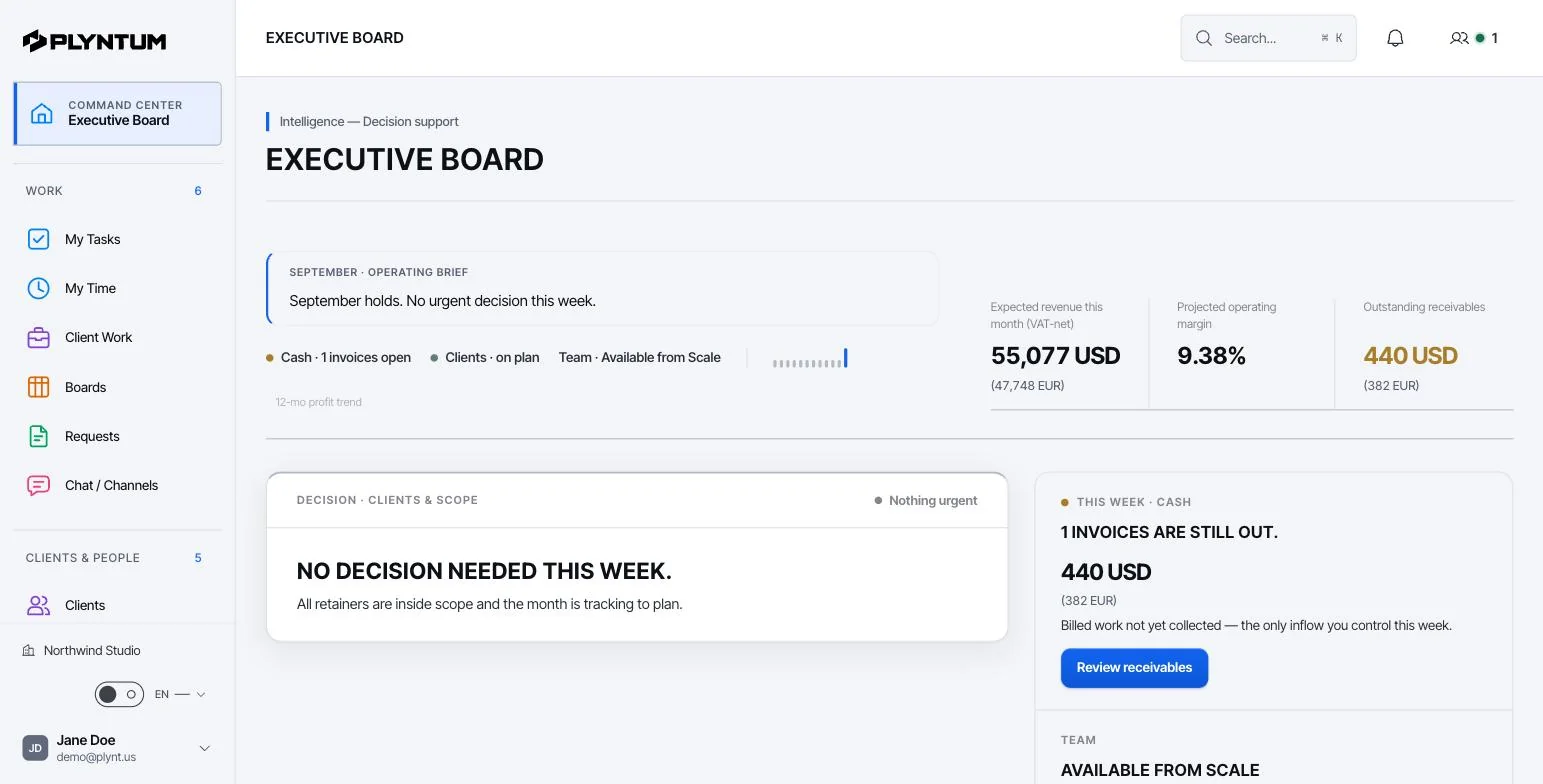
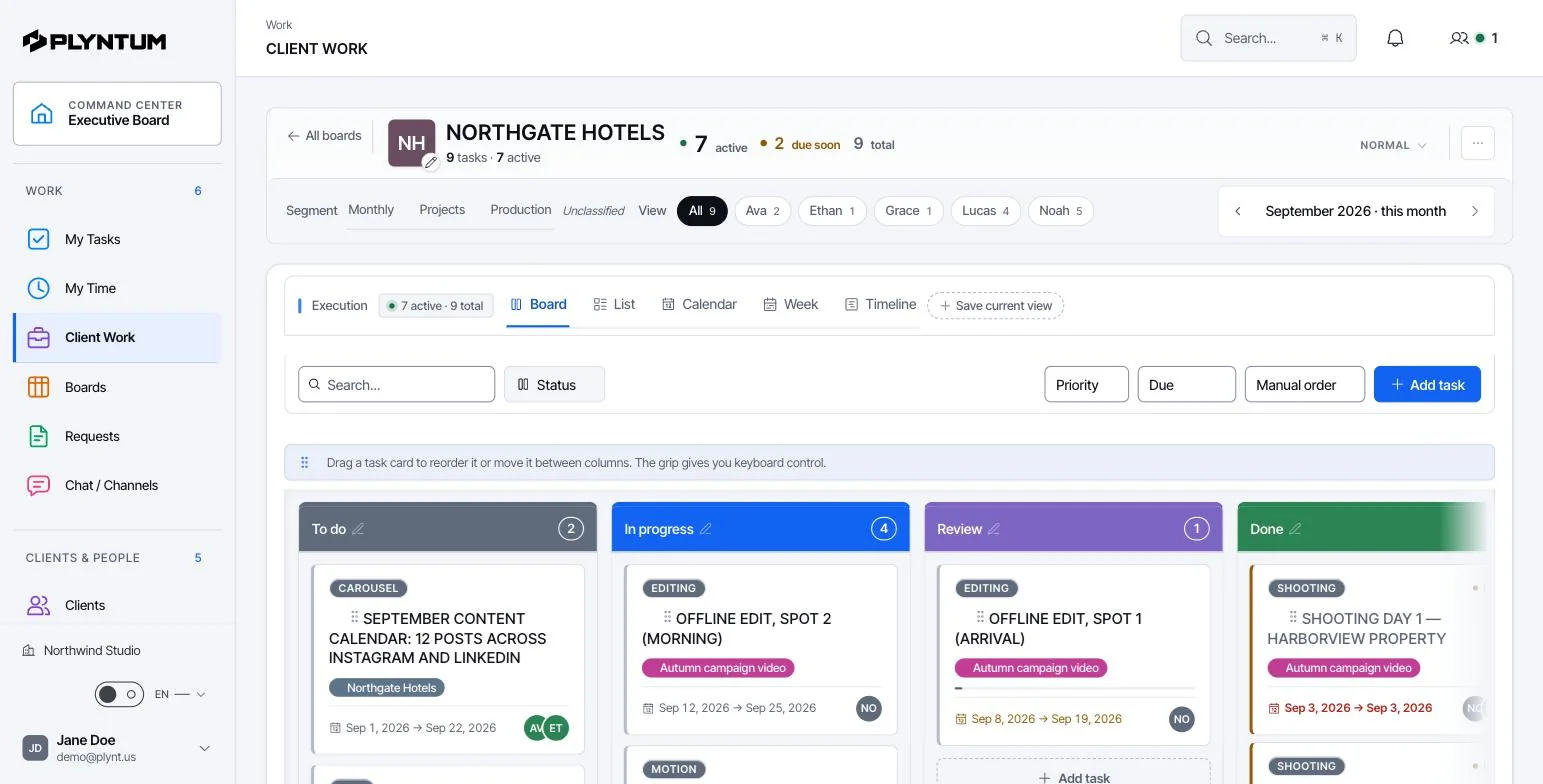
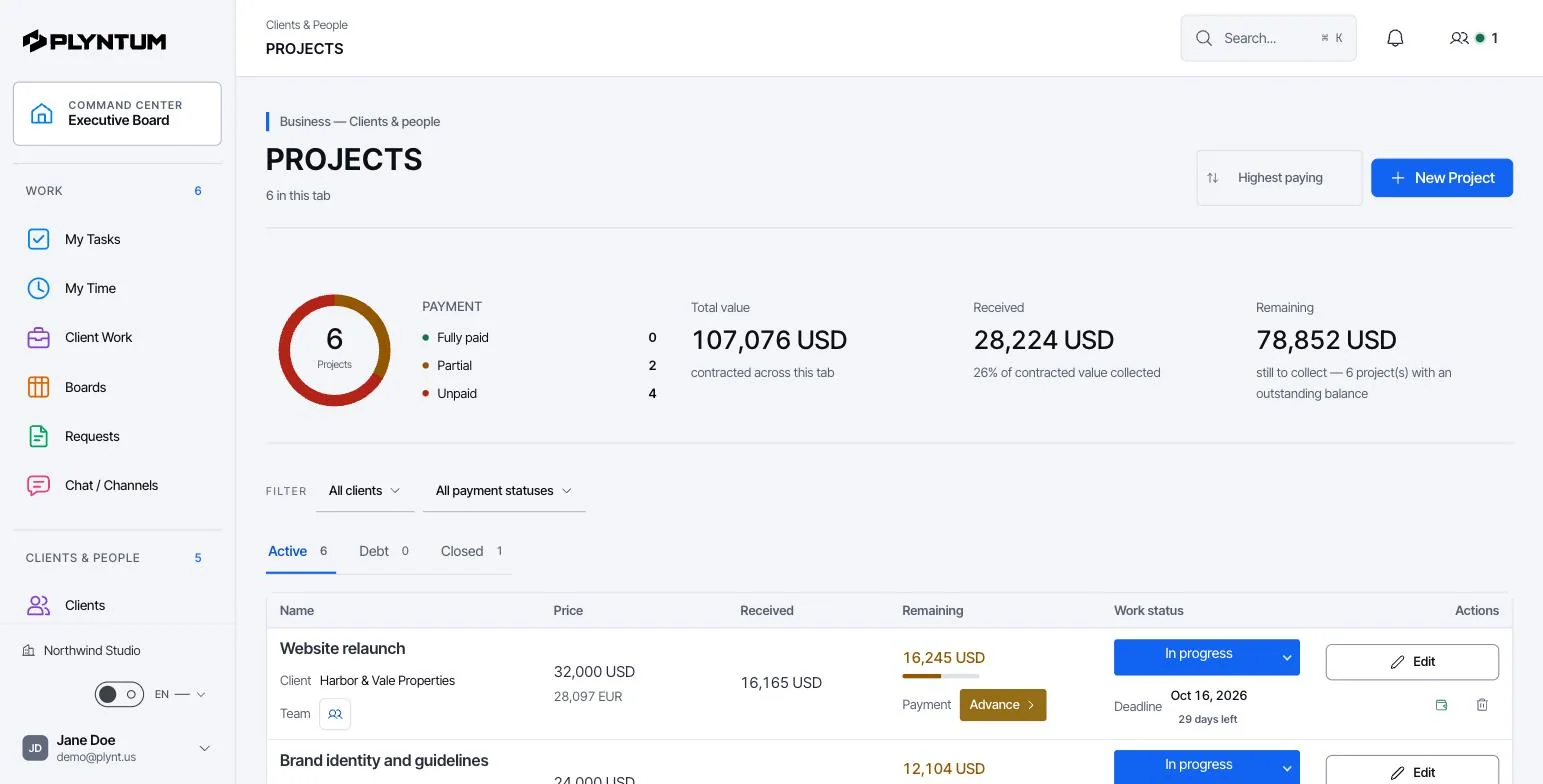
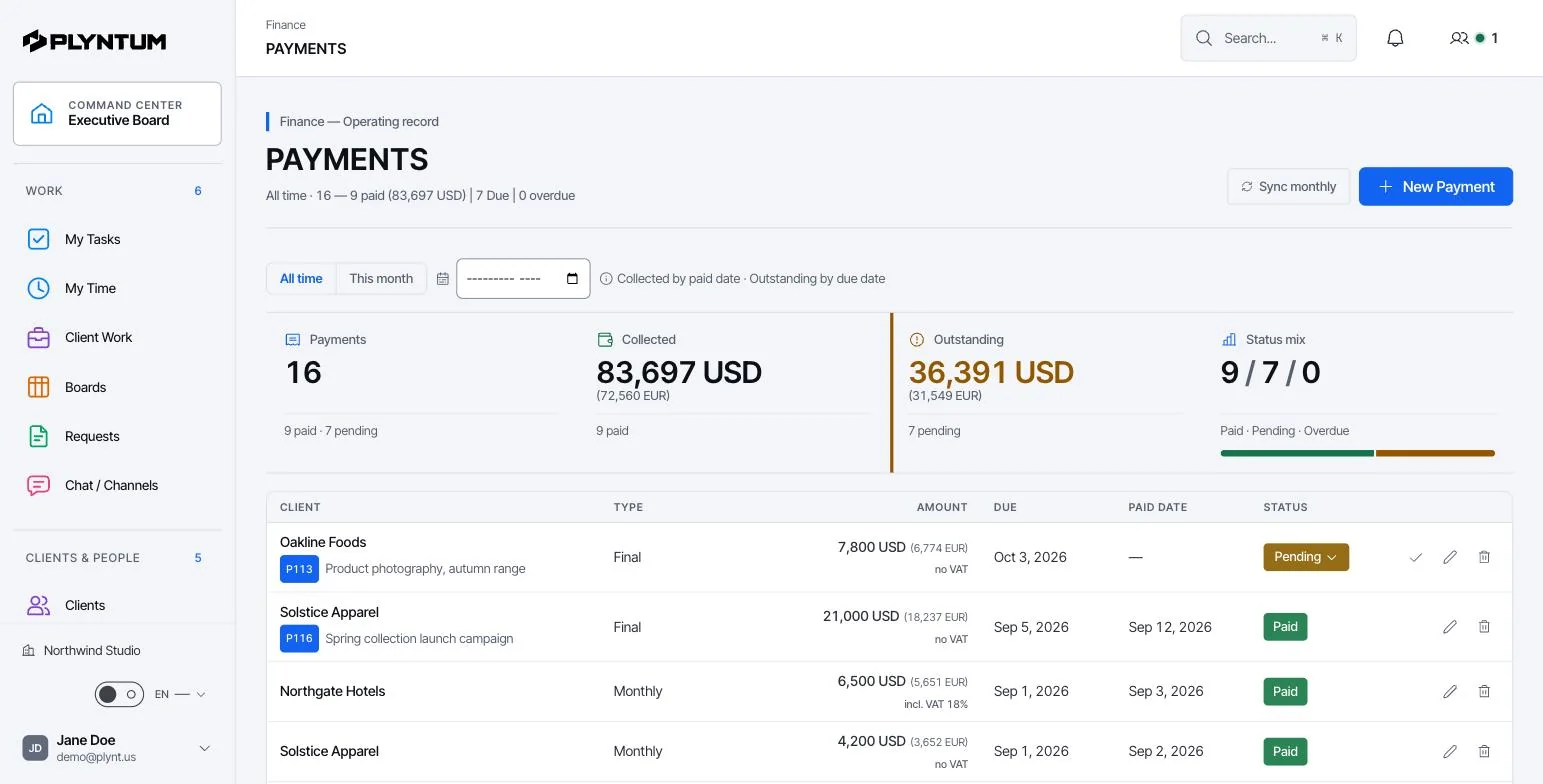
Executive Board: the month’s brief, expected revenue, operating margin and what needs a decision this week.A client’s board: to do, in progress, review, done, with an owner and a date on every card. Board, list, calendar, week and timeline views.Projects: contracted value, what has been received and what is still to collect, per project, next to its work status.Payments: collected, outstanding and the status of every invoice, by client, with due and paid dates.
Built by an agency CEO. Tested first on the agency he runs.
I run Lost & Found, a creative agency in Tbilisi: 18 people, 22 retainer clients. For years our tasks lived in one tool, hours in another and invoices in a spreadsheet, and nobody could say what a project had really cost us.
PLYNTUM is the workspace I built to answer that question. Lost & Found was its first workspace: it left six tools in 10 days and, by 17 September 2026, had run on it for three months.
Nikoloz NorieliFounder, PLYNTUM · CEO, Lost & Found
Ten people on PLYNTUM Core cost $150 a month, or $120 a month billed annually. The same ten people on per-seat tools, at each vendor’s published annual price:
Vendor prices read on 25 September 2026; Productive and Teamwork.com on 24 October 2026. Feature scope differs; each comparison page lists what is and is not included.
BEFORE YOU START
A few good questions.
PLYNTUM is business management software for agencies and service firms. It keeps projects and tasks, clients, people, time, invoices, expenses and receivables in one workspace, so every hour logged against a task counts toward its client and the project’s cost. The interface is in English and Georgian, and the company is based in Tbilisi, Georgia. Pricing is per workspace with members included: Launch is $55 a month for 5 members, Core $150 for 10, Scale $450 for 25 and Intelligence $1,050 for 50. Signing up starts a 7-day Launch trial with no card. PLYNTUM is not accounting or payroll software. Its CRM core is released for users whose workspace plan and role permit access.
PLYNTUM is priced per workspace, not per user. Launch costs $55 a month for up to 5 members, Core $150 for up to 10, Scale $450 for up to 25 and Intelligence $1,050 for up to 50. Enterprise is priced by agreement. Annual billing takes 20% off, so Core is $120 a month billed annually. Launch covers tasks, manual time tracking, invoices, expenses and receivables. Core adds manager timesheet approval, recurring invoices, project profitability and the client portal. Scale adds resource planning and renewal workflows. Signing up starts a 7-day Launch trial with no card. There is no free plan.
Companies that deliver work for clients and need to connect projects, people, time and finances. The same workspace can support creative, technology and consulting teams.
You can begin with one project and the people working on it. Set up the core workflow first, then add more projects and records as your team gets comfortable.
A 7-day trial is available on Launch only, with 1 GB of trial storage. Choose a plan before continuing to the app, where you can review the registration and billing terms.
AI analyses and the expanded AI board are still in development. This workspace focuses on work, people, time and financial visibility. Planned capabilities are not presented as active features.
No. The scan starts directly with the questions. Your answers stay in your browser. Its scores are a self-assessment based on model rules, not an audited financial result.
Lost requests
Assigned tasks
Overloaded people
Workload view
Missing work hours
Logged time
Hidden costs
Cost records
Unpaid invoices
Receivables
Forgotten renewals
Dates in one place
Lost client context
Client record
Blind reporting
Linked records
Lost requests
Assigned tasks
Overloaded people
Workload view
Missing work hours
Logged time
Hidden costs
Cost records
Unpaid invoices
Receivables
Forgotten renewals
Dates in one place
Lost client context
Client record
Blind reporting
Linked records
Lost requests
Assigned tasks
Overloaded people
Workload view
Missing work hours
Logged time
Hidden costs
Cost records
Unpaid invoices
Receivables
Forgotten renewals
Dates in one place
Lost client context
Client record
Blind reporting
Linked records
Unplanned work
Updated plan
Clashing deadlines
Shared calendar
Lost files
Task files
No clear owner
Task owners
Rigid workflows
Your own fields
Mixed company data
Separate spaces
Unlinked costs
Project costs
Unclear access
Access roles
Unplanned work
Updated plan
Clashing deadlines
Shared calendar
Lost files
Task files
No clear owner
Task owners
Rigid workflows
Your own fields
Mixed company data
Separate spaces
Unlinked costs
Project costs
Unclear access
Access roles
Unplanned work
Updated plan
Clashing deadlines
Shared calendar
Lost files
Task files
No clear owner
Task owners
Rigid workflows
Your own fields
Mixed company data
Separate spaces
Unlinked costs
Project costs
Unclear access
Access roles
Too many problems? One solution:PLYNTUM
Bring the work, people, time and finances into one connected workspace.